0.51.01
Our First Core Release
Hi Everyone!
Wow. Six months. Not counting the MegaMek-only Core Rules release we did in August, this is one of the longest development cycles the programs have ever had. It needed to be, because this is the biggest release we’ve ever done.
As you can see by the numbers below, we have pushed an unbelievable amount of code into the programs. Since 0.51.0 shipped on June 6, MegaMek, MegaMekLab and MekHQ have taken in more than 7,000 commits and about a million new lines, and roughly a third of those lines are unit tests.
| Program | Commits | Lines added | Lines removed | Lines of tests added |
|---|---|---|---|---|
| MegaMek | 3,026 | 387,784 | 36,206 | 142,168 |
| MegaMekLab | 342 | 17,856 | 2,426 | 4,277 |
| MekHQ | 3,871 | 593,898 | 147,074 | 194,043 |
| Total | 7,239 | 999,538 | 185,706 | 340,488 |
So let’s say this right up front. There is no way on this planet that a changelog can cover everything in this release. The Feature Highlights from the past six weeks cover the big features. These notes cover the rest, grouped by theme. The full changelog at the bottom lists every pull request, and we’re doing a better job of labelling each one, so you can tell whether it adds something new, fixes something, or does something else.
How we got here
We could build a release this size because, for a good chunk of this summer, we had more developers working on the projects than ever before. Things have slowed down since.
You’ve heard us talk about tech debt. If you haven’t, here’s what it means. Tech debt is the cost of old shortcuts. Code that was written in a hurry to get a feature out, or written years ago for a much smaller program, has to be worked around every time we change something near it. Think of a house where the wiring was added one room at a time. Every new light switch takes longer to put in, and it’s more likely to blow a fuse somewhere else. Paying down tech debt is the rewiring. You don’t see it, but everything after it gets faster and safer to build.
With all the code we’ve added, changed or touched in the last six months, we’ve made sizable dents in that debt, and it’s finally going to start paying dividends. New features will get easier to build, and we can catch up on things we haven’t been able to implement. We’re also looking at improvements to the MegaMek interface that line up with the interface changes already made in MekHQ. MegaMekLab will follow, but for the next few cycles the focus stays on MegaMek and MekHQ.
So long-time players will open this release and, in some ways, think nothing has changed. In other ways, everything will feel different.
A word from the team
That leads into something important, and we want to take a moment for it.
We are a volunteer team. Looking at what the programs already do, and what rules still need to be implemented, we’ve realized we need a slightly different approach from this release on. We’ve always tried to fit everyone’s needs within what the programs can do. We’re not going to stop taking requests, but we are going to be more selective about which ones we build. We can’t implement something just because one player asks for it on the tracker or on Discord. It needs to be a need shared by a larger group of players, and the developers need to see its importance too. That doesn’t mean it will never happen. It means being honest about expectations. We are the guardians of these projects, and we have to move them forward in the way we think is right.
There’s one more thing we need to call out, because it’s a pattern we’ve seen more of this year. People are forgetting that most of our developers work full-time jobs. They do this for fun, as a hobby, and for the love of the community. Some of the comments and reactions aimed at MegaMek and the other projects have been very disheartening. Please remember that we’re more than the handles you see on the screen. We’re people too. We have lost developers in the past because of how the community reacted to decisions we made, and that has been true for as long as the projects have existed.
So we ask for a little understanding, a little kindness, and a little trust. We love this game and this universe every bit as much as you do. But in the end, we have to make decisions based on what’s right for the programs’ long-term success, and for the people who volunteer to code them.
Getting 0.51.01: The MegaMek Launcher
Probably the biggest change landing with this release, and one that will be critical going forward, is the new MegaMek Launcher. This is now the way you get the programs.
Haven’t read the Launcher post yet? Stop reading this right now, click Feature Highlight: The MegaMek Launcher, and go read about the Launcher. We’ll wait.
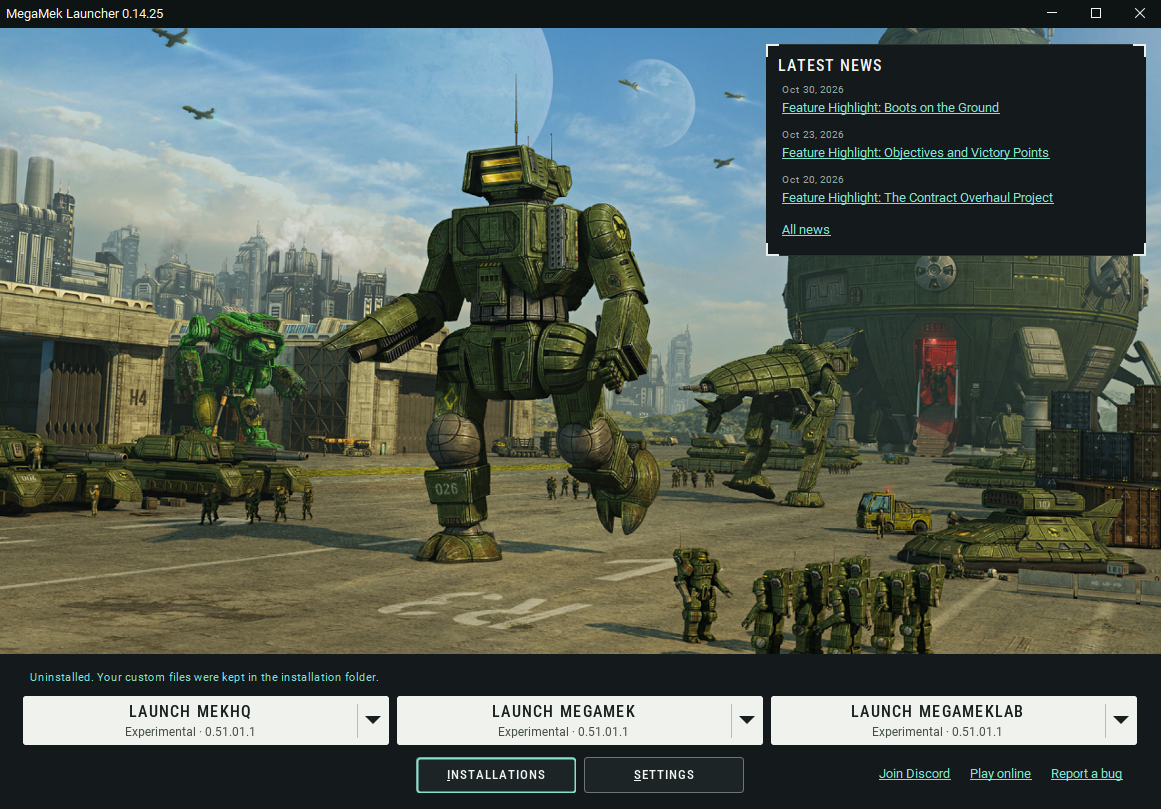
MegaMek, MegaMekLab and MekHQ, all launched from one window.
Why a launcher? Over the years we’ve realized that we created an experience that isn’t ideal for players, in two big ways.
The first is what happens after a release. We ship a new version, and a week or so later we find a crippling bug. Then we either have to rush out an emergency release, or tell everyone to wait for the next release cycle. Neither is good. And when we start a release cycle knowing there’s a critical bug out there, it changes how we run that cycle. Instead of giving it the three months it really should have, we race through it to get something out in two months just to fix that bug.
The second is the barrier to entry, which has always caused a lot of problems. You need to install Java, and then the questions start:
Do I have the right version of Java? Is my Java up to date?
Now I need to update my Java. Now I need to uninstall my Java, but it didn’t install right, so now my Java is broken.
How do I fix my broken Java? How do I unzip the program?
What do you mean the Windows unzipper isn’t good enough and I need to use 7-Zip?
We get these questions every single release. Illiani called it The Wall in the Launcher post, and we know a lot of new players bounce right off it.
We live in a world where players click a button on Steam, or any of the other launchers out there, and the game just works. We wanted that for MegaMek too. Alitar, our user interface lead, spent this cycle building it.
The Launcher post covers what it does: Java handled for you, several versions side by side, and one-button upgrades. A few things it didn’t mention. It can bring in the copies you already have. There’s a View Logs button for when you need to send us a bug report, and the latest news shows up right in the window. And you choose when to upgrade, so nothing changes in the middle of your campaign.
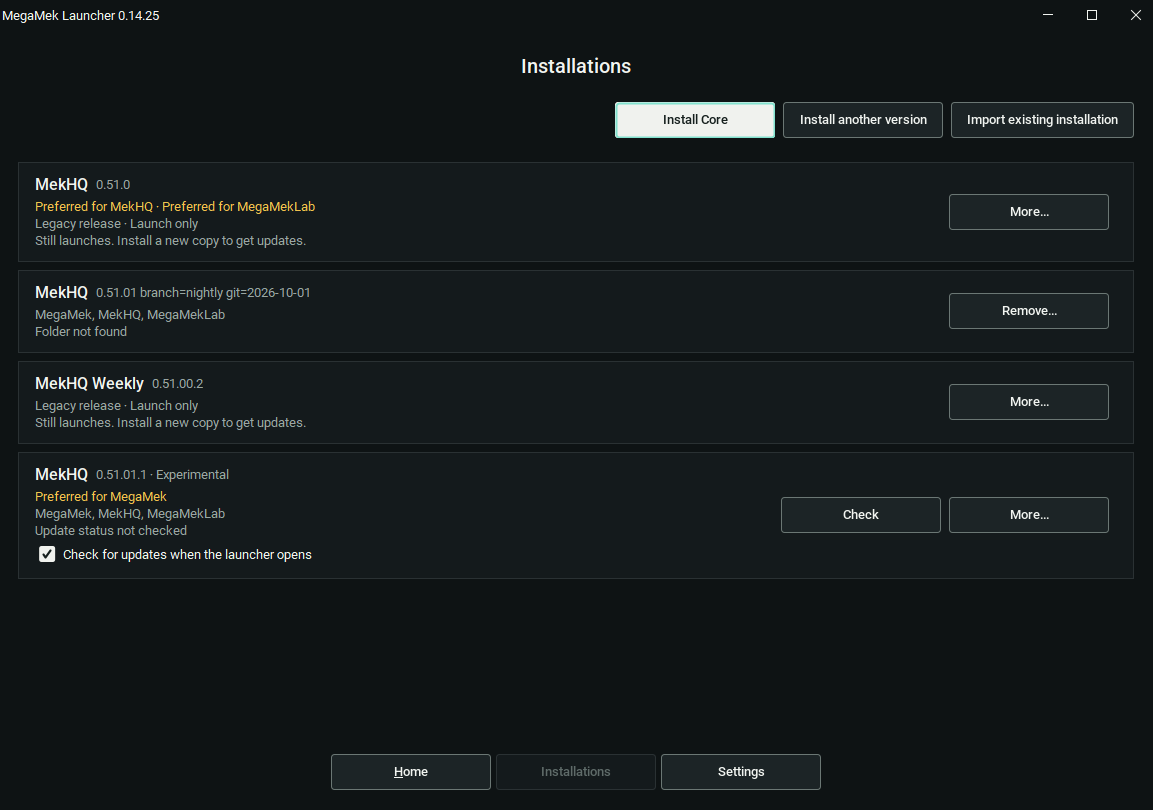
Install Core for a fresh copy, or Import existing installation to bring in the one you already have.
Always update the Launcher
You choose when to update the programs, but not the Launcher itself. Please update the Launcher whenever it asks you to. Launcher updates often include critical fixes, including security fixes, and we can’t guarantee anything will work if you open a MegaMek, MegaMekLab or MekHQ version with a Launcher older than it expects.
And this is how the Launcher fixes that first problem. When a bad bug turns up, we can ship a patch without rushing the next release. More on that in the next section.
Get the Launcher here: MegaMek Launcher.
Windows users: expect a warning, for now
The Launcher’s Windows installer isn’t code-signed yet. We’re still waiting for our code signing certificate. Until it arrives, Microsoft Defender SmartScreen may show “Windows protected your PC” (click More info, then Run anyway), and your antivirus may flag the file as a false positive. On Windows 11, Smart App Control may block it outright; if it does, wait for the signed release. Only run an installer you downloaded from megamek.org or our official GitHub releases. The Installing and Updating page has the details, including how to check the file’s SHA-256 hash.
You can still download the programs directly. The zip and tarball archives are still published, under Manual Install on the Installing and Updating page, for servers and anyone who needs one. For most players, there shouldn’t be a need to any more.
A couple of smaller changes ride along with this. MegaMek and MegaMekLab now have a What’s New dialog (Help > Release Notes) that shows every change since the version you last ran. The start scripts now work from any folder, and the Docker server image builds automatically after each release.
A New Release Rhythm: Core Releases and Experimental Releases
Over MegaMek’s lifetime, our approach to releases has changed again and again.
Way back, we had a stable release and a development release. It wasn’t uncommon to sit on a stable release for a couple of years while the development releases moved on. Those ranged from really good releases that honestly should have been called stable, to really unstable ones that should never have been released at all.
We then moved to milestones. A milestone was simply a release we marked after the fact. If we felt a development release was a good one, we declared it a milestone, and development releases kept moving forward the same way as before.
The Launcher changes things for us, and that’s why we’re now adopting two streams: Core releases and Experimental releases. The Launcher post’s A New Model of Releases section covers how often each one ships. Here’s what they mean for you.
Core releases are releases we feel we can stand on. 0.51.01 is our first one, and it’s where almost everyone should be.
Experimental releases are something you opt into, and we need to say this in very clear language. There is really only one reason to be on Experimental: you want to be a playtester, one of our Test Pilots. If you opt in, then when you come to Discord or open a bug report, we’re going to treat it as playtesting. Experimental builds change often, and a lot of things in them will be broken.
Don't opt into Experimental unless you mean it
Experimental is not early access. It isn’t a way to get the next release early, either. Experimental builds are our public test builds: beyond the bleeding edge, and there so our Test Pilots can find and report bugs. Only opt in if you’re fully prepared to report the bugs and issues you find. If you don’t intend to test, stay on Core.
That’s also why all three programs now have a bright red Report a Bug button. More on that in Reporting Bugs Has Changed below.
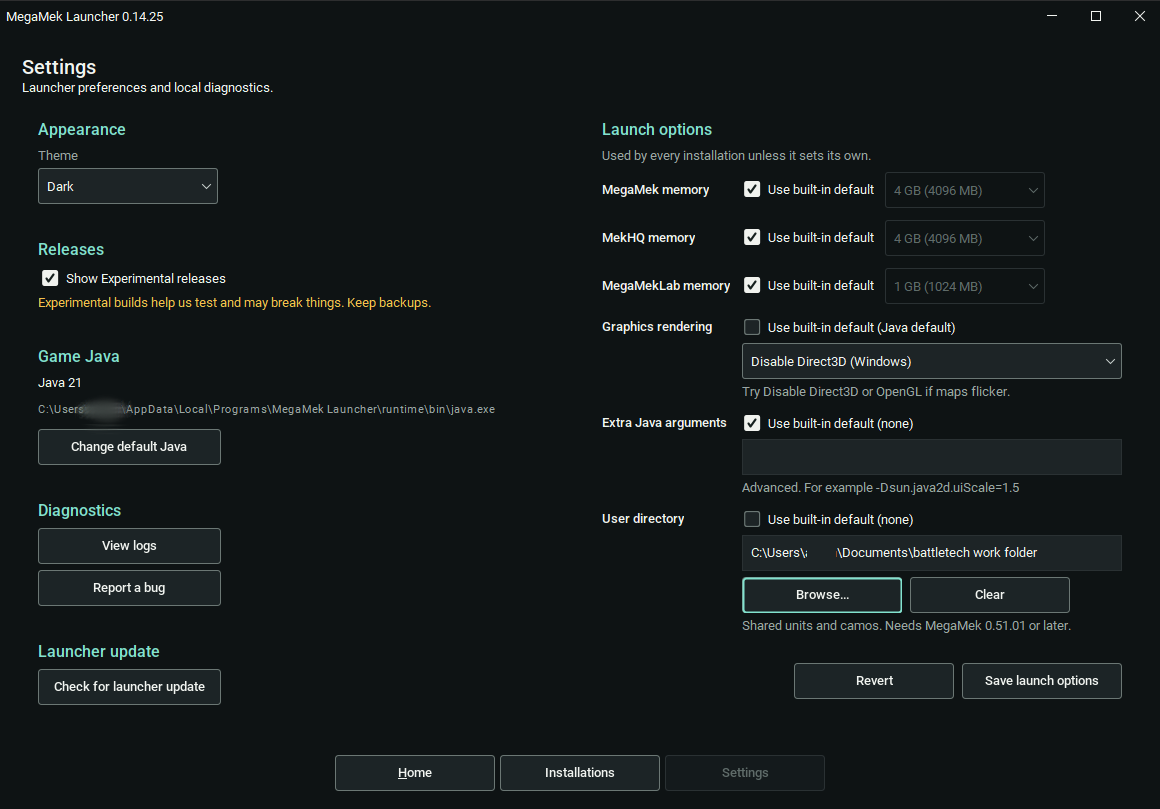
Show Experimental releases lives under Releases in the Launcher Settings. Check for launcher update is there too.
Before You Upgrade
Before you hit that update button: if you install through the Launcher, it takes care of the upgrade for you. Each version gets its own folder, and the User directory in the Launcher’s Settings shares your custom units and camos across every installation. If you keep units, camos or other custom files in a User Data Directory, point the new version at it.
MegaMek
There’s a lot in MegaMek this time. Four Feature Highlights’ worth of new things, the next round of Core Rules work, and more fixes than we could ever list. Here’s how this part is laid out. First, the Core Rules and walk-on deployment, because they change how every game plays. Then what’s new, starting with the big features that have their own Feature Highlights, then what’s improved and what’s fixed.
We lean on the earlier posts throughout this section instead of repeating them, and link each one where it fits. If you only read one, make it What’s Coming, which previewed this whole release, with videos of the Game Master tools and Objectives in action.
Core Rules and Walk-on Deployment
Back in August we did something we’d never done before: a MegaMek-only release. 0.51.00.1, the Core Rules Release brought MegaMek in line with Catalyst’s BattleTech Core Rulebook, and Core Rules Phase One explains why we did it that way. If you play MegaMekLab or MekHQ, this is the first time all of that work reaches you.
Since we launched the Core Rules, we’ve had a lot of very positive feedback on how they play. It also helped that we’d already run the playtests in MegaMek. We’ve kept implementing, refining and fixing the Core Rules since then, and we’re happy to announce that we’ve brought in one of the most wanted features in MegaMek: walk-on deployment.
It’s always on when you play under the Core Rules, and MegaMek now defaults to the Core Rules. Playing Total Warfare? Turn on the Walk-on Deployment game option and you can use it there too.
Here’s what changes. Your units don’t appear on the map in a separate Deployment phase any more. They march on from your map edge during the Movement phase, and deploying is part of their move.
- How it works. In the Movement phase, your first click picks the edge hex the unit enters on. Your second click plots its move from there. Press Escape to clear both and pick a different hex. Press Move, and the unit enters and moves in one go. For example, your Marauder MAD-3R enters on the north edge, pays for the terrain it steps onto, and spends the rest of its MP walking into the woods.
- The edge is the edge. Deployment zones are one hex deep: the map edge itself. The lobby’s player settings tell you so.
- Not every unit walks on. Units set to deploy Any or Center, and units with their deployment round set to Pre-game, are placed the old way before the game starts. Immobile units skip movement and initiative entirely.
- It works with the rest of the game. Units carrying troops, vehicles pulling trailers (the train turns to fit if it has to), individual initiative, jumping, aerospace on space maps, and fighters coming back after flying off all walk on properly. The movement envelope shows the right reach for a unit that hasn’t entered yet.
- The bots walk on too. We’ve trained both Princess and CASPAR to use it (Princess and CASPAR, Round Two, “Smarter Decisions”).
Please report anything odd
Walk-on deployment has had extensive testing, but it’s also been one of the most complex and challenging things we’ve ever had to implement. Roundtop has done a spectacular job with it. If you’re playing with walk-on deployment, and under the Core Rules you are, please report any oddities or unusual behaviour with Report a Bug.
The rest of the Core Rules work since August:
- Autocannon critical hits now work for Meks, vehicles and aerospace units.
- Shields, lances and claws follow the Core Rules.
- Indirect fire modifiers, kicks, punches and water PSRs, road elevation costs and the DFA push direction were all updated.
- Special armor rounds the Core Rules way.
- An immobile unit no longer costs you a move.
- Errata: we applied Core Rules Errata 0.1 BV for alternate munitions, the Light and Heavy Plasma Rifle BV, and the escalation rules for MASC, Blue Shield and Supercharger.
- Rulebook references now show throughout ammo, equipment and artillery, so you can look up where a rule comes from.
When we introduced the Core Rules, we asked for extra eyes on a few things that sit in very old code (Where We’d Like Eyes): superheavy Mek ammo and explosive weapon crits, underwater energy weapons, line of sight to submerged Meks, and seatbelt Piloting Skill Rolls. So far we haven’t had much feedback on those, and no issues have come in about them. We’re going to take that as a sign they’re working correctly. If you find otherwise, let us know with Report a Bug.
New
Anything marked alpha, beta or experimental is here early: it works, but expect rough edges, and please tell us what you find.
The Big Ones
We wrote a Feature Highlight for each of these. We’re not going to repeat them here, so if one sounds like your game, click through.
- Objectives and Victory Points (alpha). Games can be about more than killing everything on the map now. You place objective points in a new Victory Setup phase, and each one scores in one of six ways: Standard, Raid and Scan from the Core Rulebook, plus Hold, Defend and Capture, which are our own. The bots don’t play objectives yet.
- Boots on the Ground. A big cycle for infantry. Troops fight room to room inside buildings, Advanced Buildings get crews and turrets, and infantry weapons got a full data pass. It also covers troops riding VTOLs and WiGEs, tainted and toxic atmospheres, and armor kits and sidearms for your crews.
- Princess and CASPAR, Round Two. CASPAR, our new bot, is now yours to play against (experimental). You also get the Bot Control Panel, unit orders (alpha), artillery fire missions, and bots that understand honor and rules of engagement.
- The Command Generator. Mostly a MekHQ post, but it also covers the MegaMek Force Generator: Add to Game, formations that know which faction they belong to, and Heroic and Legendary skill levels.
Game Master Tools (beta)
In 0.51.00.1 we rebuilt Game Master mode around the Edit Damage console (Core Rules Phase One, “Game Master mode, rebuilt”). This release goes further: the Game Master now controls the battlefield itself, not just the units on it. What’s Coming has videos of it in action. To become the Game Master, request the role from the Commands menu, and the other players vote on it.
- Reshape the battlefield mid-game. Right-click a hex for Change Terrain or Modify Building (both still marked alpha in the menus). They work like a paint brush: set what you want, then paint one hex or seven at a time. Flood a valley, burn the woods down to light, raise a hill, put up a warehouse, or knock one flat. MegaMek refuses anything illegal and tells you why, and Undo takes back the last change.
- Bring a player into a game in progress. Commands → Set Up Player does it in one dialog: pick a team, choose the edge they come in from, then Apply and Reinforce from a MUL file or the unit generator. Mid-game reinforcements now live under the Game Master menu, so players can’t hand themselves a fresh lance any more.
- Hand out forces from the lobby. Add Unit, Create Random Army, the Force Generator and Load MUL can all put units on any player’s force. Before, they quietly landed on yours.
- A deeper Edit Damage console. Flip any unit’s equipment on or off, or change its mode, from ECM and C3 to MASC and AMS. Charge Bombast Lasers and PPC Capacitors. Mark weapons Jammed or Fired, mark Mek locations Breached or Blown Off, and Explode explosive equipment. Set per-unit ejection, add a this-round Target Modifier, and Restore Unit now brings back blown-off limbs.
- Give orders to bot units. Tell a bot unit to withdraw now, fight to the death, or follow its bot’s usual rules. With CASPAR, you can also give enemy lances routes and roles.
- Run the objectives. Place, edit and remove victory points mid-game, and write what a scan reveals.
- Fixed along the way.
- Skip Current Turn skips any turn. It used to work only on a disconnected player’s turn, so nine times out of ten it just said “skip failed”. Other players can still only skip a stuck turn.
- Start a Fire and Start a Firestorm work without the TacOps Start Fires option, which is really about attacks setting things alight.
- The minimap shows the right colours. A Game Master with no units, or an observer watching the bots fight, sees each side in its lobby colour instead of everything in enemy red.
Rules
- Recon Cameras are in (TO:AUE p.150), on the ground, in the air and as a bomb pod. And yes, the bots know how to use them.
- Oblique Artilleryman finally reaches further. The pilot ability (CamOps p.78) was supposed to extend artillery range, and now it does.
- Artemis and Apollo have an off switch. Artemis IV, Artemis V, Proto Artemis and Apollo now have On and Off modes, just like ECM.
- The Virtual Reality Piloting Pod is playable (IO:AE p.63). It used to be construction only: you could build it into a unit, but it did nothing in a game. Now it does.
- Avoiding Shutdown is its own option now. Turning on the expanded heat scale used to drag the TacOps Avoiding Shutdown rule in with it. Now you can have either one without the other, under either ruleset.
Unit Fluff
- More unit fluff.
- A unit can now have several fluff images, and the unit readout has
<>buttons to flip through them. We’re not shipping the images in this release. They’ll come later as a separate download. - Want to add your own images? Put them in folders under
data/images/fluff/and the readout picks them up. Using the Atlas as an example:Mek/Atlas/Atlas AS7-D/holds as many images as you like for the AS7-D only.Mek/Atlas/holds images for every other Atlas.- A single
Mek/Atlas AS7-D.pngorMek/Atlas.pngstill works the way it always has. - Clan Meks work under either name, so
Mad Cat/andTimber Wolf/both match.
- A unit can now have several fluff images, and the unit readout has
Improvements
Lots of smaller things that make MegaMek nicer to live with.
C3 Networks
If you’ve ever tried to set up a C3 network in the lobby, you know it was a fight. Long chains of right-click menus, and nothing to show you what you’d actually built. Not any more. (What’s Coming promised we’d cover this later. This is later.) Meet the new C3 Network Manager. Click the C3 Networks… button in the lobby (it shows up as soon as you have C3 units), or right-click a C3 unit and pick C3 → Open C3 Network Manager.
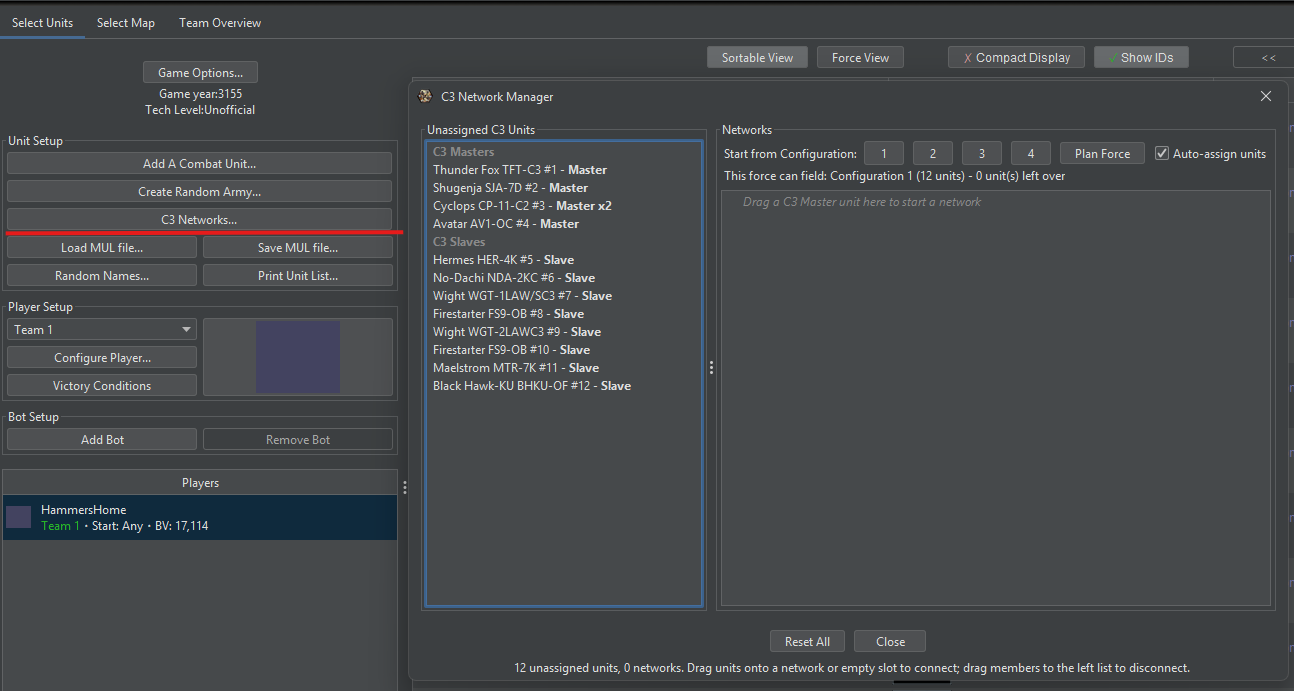
The new C3 Networks button in the lobby opens the C3 Network Manager. Pick a configuration, or let Plan Force sort it out.
- Pick a configuration and fill the slots. Your C3 units are listed on the left, masters first. Pick one of the four configurations from the C3 diagram in the Core Rulebook (p.199), then drop your units into the colour-coded slots.
- Or do it your own way. Drag a master in and build out from there. Drag a unit back to the left list to take it out of a network.
- Every kind of C3. C3i, Naval C3 and Nova CEWS all work in the same window.
- Let it do the work for you. Hit Plan Force and MegaMek works out how your whole force splits into networks, then sets them up. Leave Auto-assign units ticked and it keeps your lobby lances together.
- All four configurations actually work now. MegaMek used to cap a unit at two C3 masters with three slaves each, so Configurations 3 and 4 couldn’t be built at all. That cap is gone.
- You can finally see your networks. The unit table draws each C3 network as a tree, and keeps it together no matter how you sort.
- New option: C3 Emergency Master (TO:AUE p.110). It’s off by default.
Configuration Changes
Here’s a quick look at the new settings, then what changed and where to find it.
A quick tour of the configuration changes.
- Client Settings got a makeover. You can search it, the sections make more sense, and every option explains what it does.
- Pilot implants, all in one place. The Manei Domini checkbox is folded into the Neural Interface dropdown, which is now called Pilot Implants. The lobby and the pilot tooltip show the gunnery and piloting your pilot actually rolls against, with an asterisk wherever an implant changed it.
- You choose which sensor a unit starts on. Units used to start every battle on radar, whether you wanted it or not.
- Rank your preferred sensors once in Client Settings.
- Or pick a starting sensor for a single unit in the lobby.
- Tick Remember for this unit type and every unit of that design starts on it, in MekHQ too.
- Lobby backups don’t pile up forever. A new Lobby backups to keep setting (Client Settings, Advanced) keeps the newest 5. Set it to 0 if you’d rather keep them all.
- Friendlier tooltips. Option tooltips wrap their text and wait a moment before popping up.
Lobby
- Your force changes stick now. Renaming a force, dragging one force onto another, or reassigning one used to quietly fail to reach the server, so your renames snapped back. That’s fixed, and saved unit lists reload in the order you arranged them.
- Which bot did you get? Princess and CASPAR keep the same name when you switch between them, so you couldn’t tell. Now the lobby chat tells you.
Board and Map
- Click a hex number to go there. In the report pane, click “hex 0612” and the map jumps to that hex, even if it’s on another board.
- The minimap.
- Every unit gets a coloured dot for its damage: green for light, yellow for moderate, red for heavy, black for crippled. It follows your Show damage level setting.
- Some of the minimap themes were hard to read, so we’ve kept the one that works and dropped the rest. Your main MegaMek skin isn’t touched.
- Movement labels fit the hex. Long labels shrink instead of getting cut off. Think
12++++++++++on a WiGE coming down ten hexes. - The LOS ruler picks a side. Where a line of sight runs through a split hex, the ruler now shows which side it actually took, instead of lighting up both.
- Reset Zoom. Zoomed yourself into a corner? A new menu item puts the board back to normal.
Sound
- The “my turn” sound plays whenever the game is waiting on you. That now includes the Targeting, Off-board, Pre-movement and Pre-firing phases, plus decision pop-ups like point-blank shots and manual AMS. Don’t want it? The first time it plays, MegaMek asks if you’d like it muted, and you can change your mind later in Client Settings.
- Ping a player. Somebody gone quiet on their turn? Give them a nudge.
- In a game, use Commands > Ping to ping one player or everyone. In the lobby, right-click a player’s row.
- Pings have their own sound, with their own mute box in Client Settings > Audio. And no, you can’t spam it: one ping every 10 seconds.
Windows, Speed and Files
- Reset Window Positions actually resets them. It now catches the unit selector, bot commands, the army creator and the other windows it used to miss. It just moves them back to the top left, without shrinking them or messing with your minimap zoom.
- Lost windows come back. Unplugged the monitor a window was saved on? It now opens on a screen you can actually see.
- GUI scale and monitor changes. The main menu buttons and splash art no longer go sideways when you change GUI scale or move to another monitor.
- The unit selector doesn’t lag any more. Picking units and opening readouts could crawl, especially if your user folder syncs to the cloud.
- The unit cache stays clean. Every upgrade used to add yet another copy of every zipped unit.
- Your combat summary GIF goes where you want it. Set a GIF save folder in Client Settings > Mini Map, and MegaMek tells you where the file ended up. The save prompt also waits for your answer now, instead of closing on you.
Bug Fixes
Here are the fixes you’re most likely to have run into, grouped by what you’d be doing at the time. For everything else, see Help > Release Notes in MegaMek, or the full changelog at the bottom of this post. The bot fixes, about 30 of them including the bots’ artillery, are in the Princess and CASPAR highlight.
Infantry
We fixed a lot of infantry bugs this cycle, and Boots on the Ground covers most of them. Here’s what it didn’t mention:
- Missiles hit the way they should.
- Fighter missiles against infantry do the right damage.
- iATM IMP missiles fired at an airborne fighter actually do something now: damage, plus their IMP effects.
- Battle armor.
- Autoconfig and Randomize only load rounds battle armor can use (no more BattleMek rounds like Acid or Tandem-Charge), and the bins keep their shot count. Clan SRM, LRM and ATM bins now actually change when you autoconfig.
- Some suits with turrets wouldn’t load at all. Now they do.
- The Myomer Booster has the right weight and cost, and AP, modular and turret weapon mounts cost what they should.
- Aimed shots don’t crash the game. Aiming at a tank or battle armor squad in partial cover used to bring the whole thing down.
- Conventional infantry.
- Mechanized platoons (hover, wheeled or tracked) get their fifth squad.
- Platoons carrying a Support PPC are checked for validity and movement.
Buildings
- Burning buildings tell you what’s going on. Each turn the report shows how much Construction Factor the fire ate and what’s left. When it hits 0, the hex comes down right then.
- Hidden turrets get their point-blank shot. A revealed hidden unit can turn its turret before firing, and the shot actually goes off.
- Semi-Guided missiles fired at a building or hex no longer freeze the game.
- Bridge heights make sense. Standing on a bridge or a fuel tank, the Choose Target dialog shows the real height, not -2,147,483,648.
VTOLs, WiGEs and Hovercraft
WiGEs got a top-to-bottom pass against Total Warfare and TO:AUE. What’s Coming gave it one line, so here’s the whole list.
- Airborne WiGEs.
- No more free cliff climbing (TW p.55).
- No extra MP going downhill. Keep Elevation is still there if you want it.
- They can cross low bridges from any direction.
- Flying over a weak building can bring down the whole hex, not just the top floor.
- Sideslips, jumps, landings and crashes follow the book. VTOL and WiGE sideslips (TW pp.67–68), WiGE jumps (TO:AUE p.162), and WiGE landings and crashes all play by their rules now.
- Grounded WiGEs follow the hover terrain rules, and support WiGEs play by the same rules as combat WiGEs. A bot with a grounded WiGE takes off again, instead of crawling along 1 hex a turn.
- Hovercraft and submerged units. A hovercraft on water can’t see or shoot units on the bottom, and they can’t see it either.
- Everything that flies.
- Nothing flies in a vacuum. Hovercraft, WiGEs and VTOLs can’t operate on a vacuum map, even with Environmental Sealing.
- Flak keeps its bonus against a VTOL, WiGE or AirMek that flew this turn and then landed.
- A VTOL or WiGE that deploys airborne can’t deploy hidden.
- Blowing sand no longer damages VTOLs still waiting to enter the map.
Aerospace, LAMs and Large Craft
About 30 fixes, and almost none of them made it into another post.
- LAMs.
- Artillery flak damages a LAM in AirMek mode.
- A fallen AirMek gets its Get Up button back.
- LAMs in AirMek mode can’t jump (IO:AE p.102). In Mek mode, they still can.
- Converting a LAM before it’s on the board no longer crashes the game.
- Fighters.
- Cluster weapons fired at ground units work the way the rules say, and missile and rocket hits show their attack value in the report.
- A fighter that lost control from heat and flew off comes back under control.
- A fighter pilot hurt while ejecting rolls for consciousness right away.
- Space battles no longer freeze after an ejected pilot gets picked up.
- Bombs.
- Bomb missiles have the right ranges, and you can actually load LAA and ASEW now.
- In a bomb run, every bomb rolls its own to-hit, even after one scatters off the board.
- A Large FAB is one bomb, not two.
- Large craft.
- Weapon bays no longer do negative damage. Yes, that healed the target. Bays and fighter weapons use their attack value again.
- Firing everything in a big space battle no longer crashes the firing phase.
- Ammo bins round up to the right tonnage.
- Damage to a JumpShip’s K-F drive, grav decks and docking collars is saved.
- DropShips.
- A grounded DropShip can be targeted through, and fire from, any of its 7 hexes, not just the middle one.
- Under double blind, a DropShip can’t land on a hidden enemy. The server says no and reveals the unit in the way.
- Units can board a grounded DropShip through a friendly Mek’s hex (TW pp.86–91), and cranes can load them.
Artillery and Ordnance
- Artillery in flight doesn’t break your saves. A game saved with FASCAM or Thunder-Vibrabomb in the air no longer crashes when the round lands. And a game with a round still in flight after the unit that fired it left can be loaded again.
- Illumination rounds light up right away, the turn they land, on the map they were fired at.
- Fuel-air ordnance follows the book (IO:AE pp.159–160), including its damage to infantry and battle armor. On multi-board maps, it goes off on the board it hits.
- Arrow IV flak hurts. Meks making an atmospheric drop used to shrug it off completely.
Movement, Terrain and Physical Attacks
- Meks can climb (TO:AR p.20). Turn on TacOps Climbing (Advanced Ground Movement), and a Mek with working arms can climb cliffs and buildings, then climb or drop back down.
- We’ve already tidied it up since it first went in: walking off big drops, the climb-down cost, and a warning that showed when you’d only run out of MP.
- Terrain.
- Partial cover from water works again.
- A hull-down Mek can brace an arm against the hill or building in front of it.
- An immobile vehicle on unbroken ice only sinks if the ice actually breaks.
- Physical attacks.
- With simultaneous physical attacks on, breaking free of a grapple no longer hangs the game.
- If your DFA target dies first, your Mek now lands and rolls to stay standing, instead of hanging in mid-air.
- And a few more.
- Nightwalker pilots can run in poor light.
- A Mek can’t end its move on top of a hidden Mek from its own side.
- Shifting wind changes one step at a time and stays inside the limits you set.
Unit and Equipment Data
A lot of these were reported in MegaMekLab and fixed in MegaMek, so all three programs get them.
- Ammo.
- Standard ammo has the same tech progression as the gun that fires it, so a game can’t allow the gun and forbid its ammo.
- Rifle ammo no longer shows as Experimental before 3084.
- Follow the Leader LRM ammo is back from 3046. It had gone missing from every game after 2770.
- Standard autocannons are no longer offered Gauss Autocannon ammo.
- Support vehicles.
- Armor points round correctly from tonnage.
- Fission and fuel cell engines have the right tech level.
- Vehicles and fighters keep their large engine when loaded from a file.
- Modular armor can’t go in the body.
- ProtoMeks.
- Ultraheavies like the Boggart and Sprite no longer show as invalid.
- Targeting computers no longer offer aimed shots against them.
- LB-X under EMI. Cluster rolls under EMI are fixed.
- Unit costs are whole C-bills again, after a short-lived switch to decimals.
MegaMekLab
To be honest, MegaMekLab hasn’t had nearly as much work this cycle as MegaMek and MekHQ. But while it hasn’t drawn a lot of attention, it picked up a couple of really big and exciting features.
Build Battlefield Support Assets. You can now build Battlefield Support Assets and export their cards. Make a standalone card, or attach one to a regular unit, and it prints or exports to PDF with the rest of your force, on US Letter or A4.
Availability for your custom units. This is probably the one players have wanted the longest. If you had a custom unit, there was no good way to get it into a randomly generated force. Now there is. Open the new Availability tab, set which factions field your unit and how often, and the RAT Generator picks it up. Roll up a force, and you might just see your favourite unit in action.
- Give each faction a prevalence from 0 to 10, shown with a word next to the number (Very Rare, Rare, Uncommon, Typical, Common), and change it over time with start and end years.
- The faction list only shows factions that exist in your unit’s introduction year, so Clan Wolf never shows up for a 3150 design.
- Starting from scratch? Copy Availability From Unit borrows the numbers from an existing design. You can tick the unit’s mission roles too.
- The Factions view on the Preview tab shows how common your unit is with each faction, era by era.
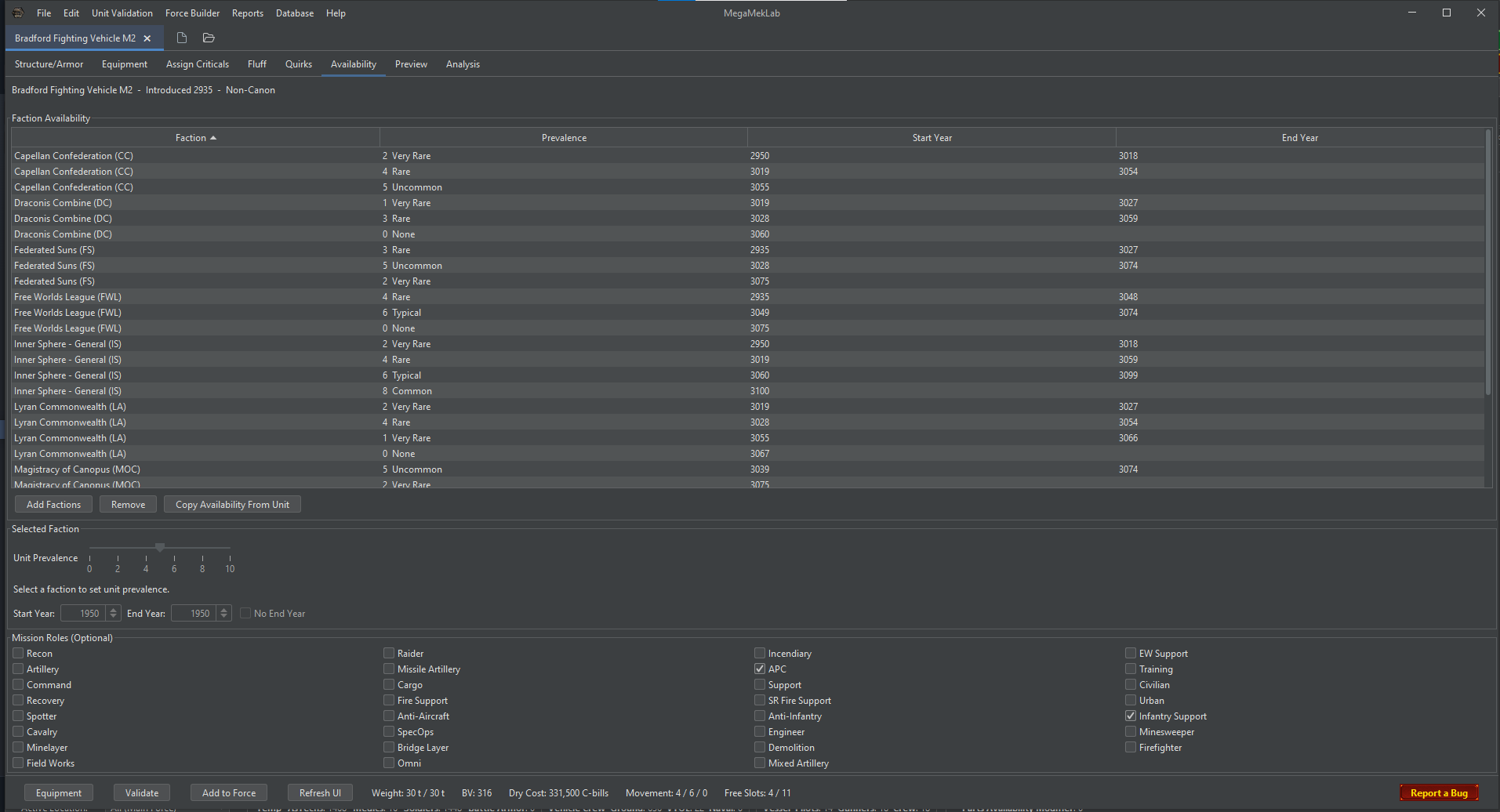
Set how common your unit is, faction by faction and year by year.
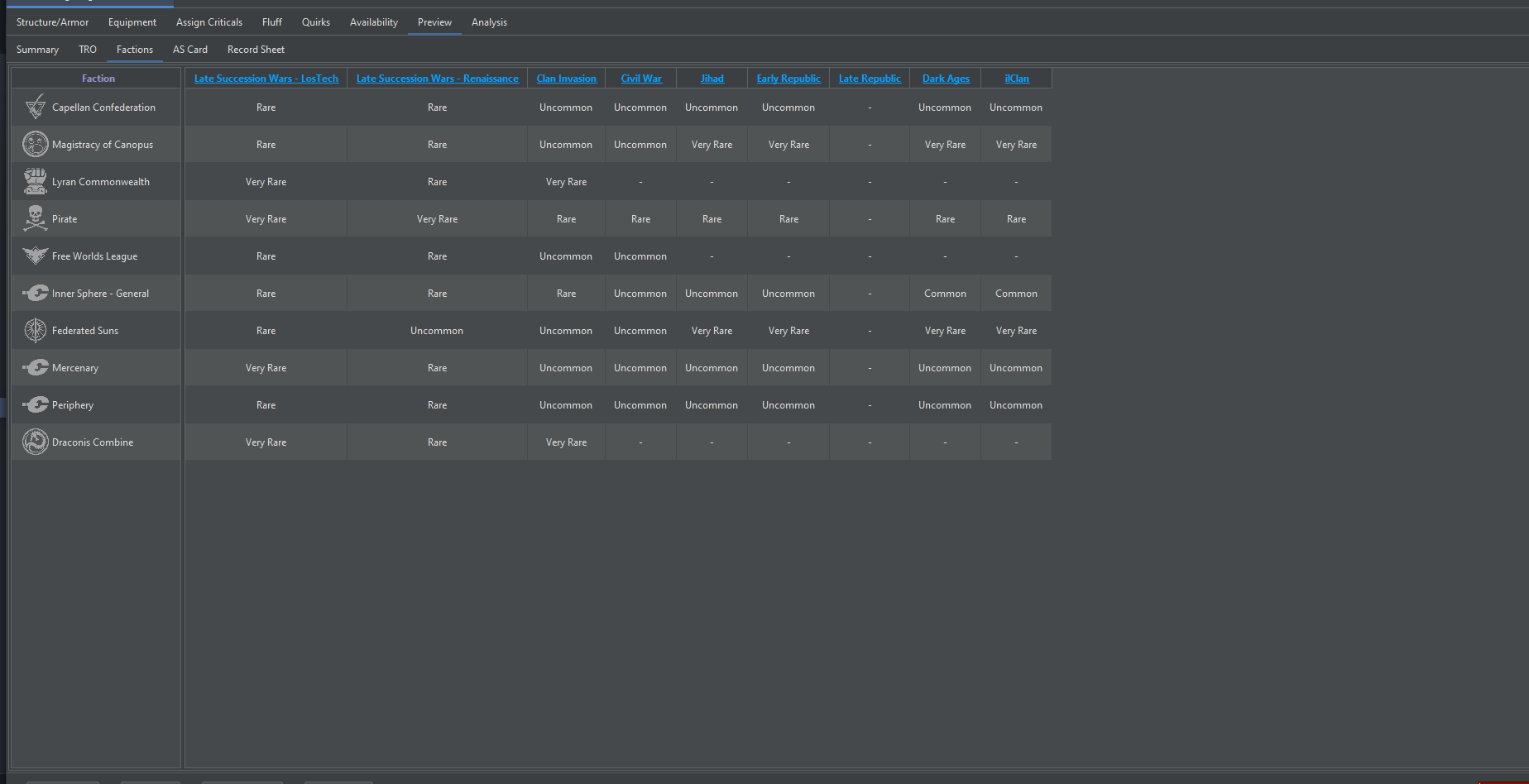
The Preview tab shows how common it is in every era.
An Analysis tab. This one we borrowed from Solaris Skunk Works. Every unit editor now has an Analysis tab next to Preview, a fun way to see your design’s damage at each range and the directions it can fire. It updates as you build, so swap a weapon and watch the curves change.
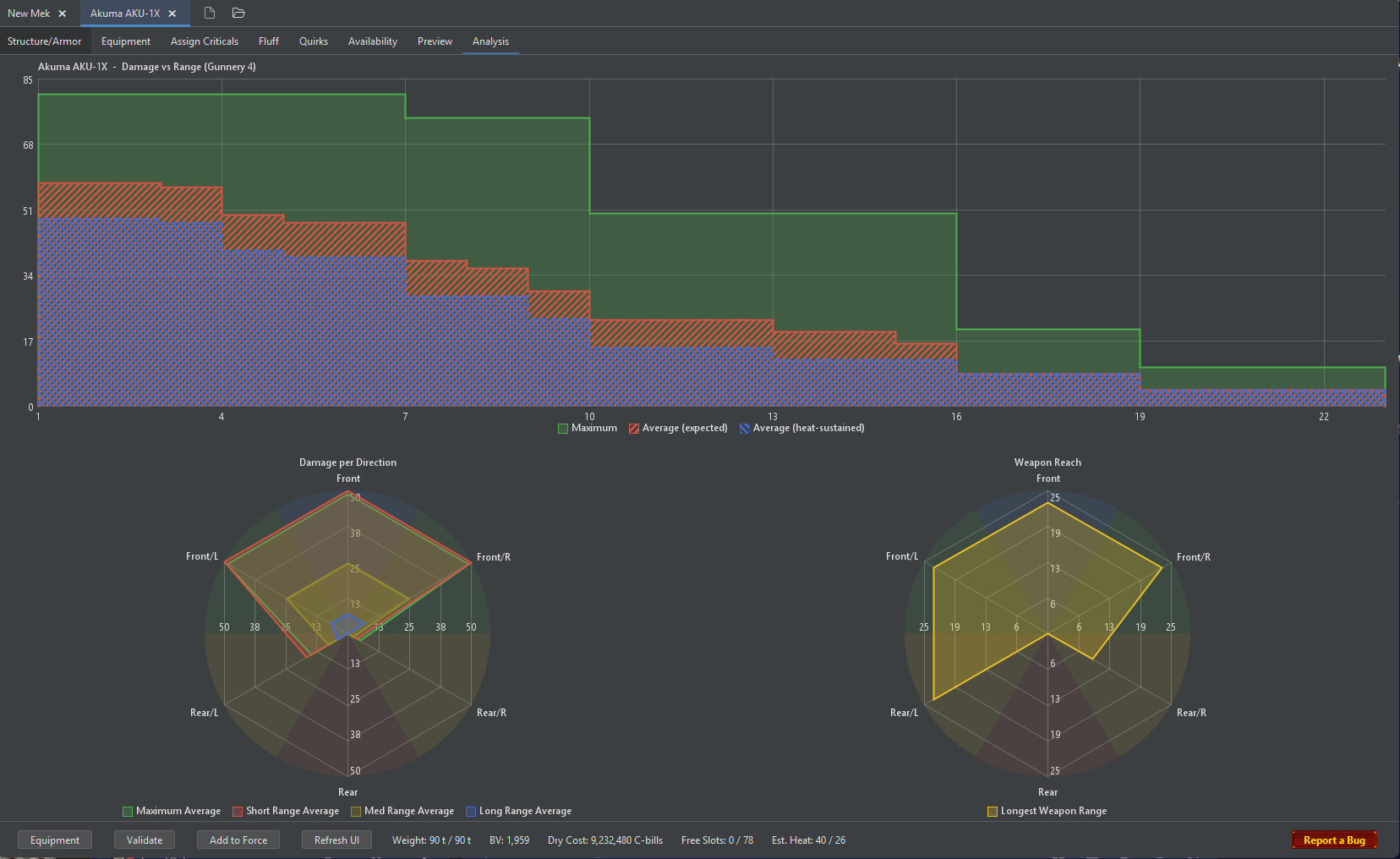
Damage at every range, and which way the Akuma AKU-1X can hit.
Disposable weapons for infantry. Infantry got some work to support the new disposable weapons rules (TO:AR p.106). Conventional infantry and battle armor can carry them, at Advanced tech level and above. Boots on the Ground covers how they play.
A sourcebook reference library. This is one of the bigger changes we’re making across the programs. No, it doesn’t mean the sourcebooks are in the program. It means we’re linking each unit to the book it comes from, so you can see where it was published, and then linking out to the store. Got a favourite Mek and want to know which TRO it’s in? You can go straight there.
- The sourcebook editor has a First Published field.
- The sourcebook buttons in the unit editor open the store page, instead of a dead MUL link.
- Rulebook references work the same way. A piece of equipment can point to more than one book, and you can search them.
We’ve also made some improvements to Omnis, plus a round of general fixes. Here’s the rest.
New Features
A few more new things:
- More to build with.
- Combat vehicles and conventional fighters get their own Chassis Modifications panels.
- Large craft fill in the officers they need from their crew size, and new Auto-Assign Lifeboats and Auto-Assign Escape Pods buttons count everyone aboard, bay crews, passengers and marines included.
- A weapon can carry more than one enhancement, so a laser can have an insulator and a pulse module together. They stay with their weapon when you sort, move or copy it.
- Check a unit’s tech level. Reports > Composite Tech Level shows the tech level of the unit you’re editing, one from the cache, or one from a file, and what it would be under the other tech rule.
- Your units keep their own ID. Save As gives the copy a new one, and if you save over a unit, you’re asked whether to keep its ID or make a new one.
- Around the program.
- Not a fan of the story text? Show unit fluff (Options > General) hides the Fluff tab and the story text. It’s the same setting as in MegaMek and MekHQ, so one switch covers all three.
- Help > Release Notes shows everything that changed since the version you last ran. It only opens when you ask.
Improvements
- Omni units keep their fixed equipment fixed. We said we’d made some improvements to Omnis. If you build them, this one’s for you.
- New equipment goes in as pods, unless the rules say it has to be fixed.
- Editing an OmniMek’s pods no longer turns its fixed equipment into pods.
- Remove All Pods and Reset leave the base chassis alone and only clear the pods.
- In MekHQ, that means a pod swap stays an OmniPod Reconfiguration instead of turning into a Class F refit.
- Record sheets that know which rules you play.
- Pick Total Warfare or the Core Rules, and the sheet prints charge damage and shields to match. Under the Core Rules, the shield’s damage is folded into the punch. Total Warfare sheets look the same as before.
- Inventory text scales and spaces itself better.
- Large support vehicles and superheavies get their own location tables.
- Rear modular armor pips print on Mek sheets.
- A tidier editor.
- The Assign Criticals tab lines up the same way for every unit type.
- The Availability tab has clearer labels, and battle armor menus are capitalised properly.
- “New Tank” is now “New Combat Vehicle”. New combat vehicles start out tracked, and support vehicle types are listed in TechManual order.
- The conventional infantry reference column moved to the stats view, like every other equipment table.
- Reset Window Positions now resets the unit selector too, and MegaMekLab opens at a sensible size the first time you run it.
Bug Fixes
Here’s what we fixed, by unit type. The full changelog has the rest.
- Vehicles.
- Changing a support vehicle’s fire control updates the gunners it needs.
- Unticking Trailer on a combat vehicle puts its control systems back.
- Support vehicle armor weight updates as soon as you change the armor, not when you allocate it.
- Changing armor type no longer leaves the armor tonnage above the new maximum, and no longer sets it wrong on advanced aerospace units.
- A tank with two turrets no longer swaps the front and back turret.
- Engines are listed in the right order for aerospace units, BattleMeks and combat vehicles.
- Aerospace and small craft.
- Small craft right-click menus show the right options.
- The Screen Launcher is under Capital weapons, not Missile and Other.
- Ammo in a weapon bay links to its weapons, and the bay’s ammo capacity updates when you add to it.
- Infantry and battle armor.
- Picking or dropping an infantry type with SCUBA or TAG adds and removes the specialization properly, and keeps your secondary weapons within the limit.
- Custom armor for conventional infantry can have its own name.
- The weapon list for conventional infantry only shows weapons the platoon can crew, and it refreshes when you change motive type or platoon size.
- Support PPCs are only offered when the platoon can carry one, and support weapons disappear when the platoon can’t take secondary weapons.
- The HarJel checkbox turns on when it should.
- Meks and ProtoMeks.
- The Mek tonnage range in the builder is right.
- Switching prototype double heat sinks to single works again.
- Removing heat sinks takes the OmniPod-mounted ones first.
- Freezers auto-fill again. They were being counted as engine-free heat sinks.
- ProtoMeks get the right minimum run and flank MP, and gliders get the right enhancement and jump options. The Configuration label is now Chassis Type.
- The status bar’s heat estimate uses the jump MP the Mek actually has.
- Saving files.
- Characters Windows won’t allow in a file name are stripped out when you save a unit.
- MegaMekLab checks a MUL file’s version before loading it.
Thank you, WellBattle6
A lot of the fixes and improvements in MegaMekLab this cycle came from a new outside contributor, WellBattle6. Thank you for everything you’ve put into the project.
MekHQ
The last six months have seen a staggering amount of work done in MekHQ. The issue trackers have effectively been cleaned out. Other than a few requests for enhancements, every bug has been checked and tested. The interface has been reworked too. AlitarSemiramis rebuilt the interstellar map, and Illiani took that work and ran with it across the rest of MekHQ.
We still have a lot of voyages ahead with MekHQ. We understand that when some of you fire up MekHQ, you’re going to be a little surprised by how much has changed. Please understand that it’s all part of improving the overall experience. These changes had a lot of playtesting and a lot of feedback behind them, and I for one think this is an awesome direction for the program.
From here, I’m handing the notes over to Illiani.
Before You Upgrade Your Campaign
Existing MekHQ campaigns
0.51.01 will happily load your older campaigns, but when it does, every open contract and mission is closed automatically. Outstanding payments are collected, POWs are ransomed, and the contract counts as a complete success. You don’t need to do anything special. It just happens.
We’re going to be upfront with you, though. 0.51.01 is a whole new beast, and it deserves to be met on its own terms. If there was ever a time to start a new campaign, it’s now. If you do carry a campaign forward, please switch it to one of the default presets when you upgrade.
More in The Contract Overhaul Project and Balancing Gameplay and Economics.
Feature Highlights
The Contract Overhaul, the economy rebalance and the Command Generator have their own Feature Highlights. Read those for the full picture.
- The Contract Overhaul Project
- Balancing Gameplay & Economics
- The Command Generator
- Boots on the Ground → In Your Campaign: personal equipment and armor kits
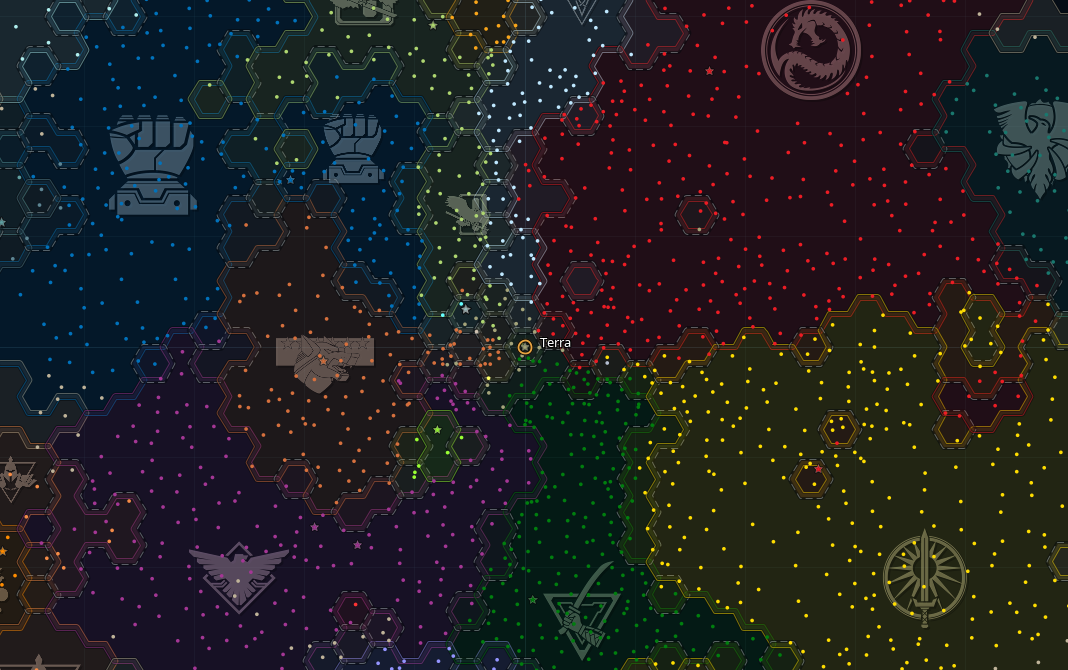
The Inner Sphere awaits. Where to, commander?
New Features
Campaign & Contracts
- Contract Overhaul Project: Throughout the entire 0.51.01 development cycle, we were hard at work on the Contract Overhaul Project, a titanic effort to completely rewrite every aspect of the contract experience. Expect new mechanics, an all-new UI, and surprise situations. Read the Contract Overhaul highlight →
- The aging Company Generator has been replaced by a brand-new Command Generator that fully supports combined arms play. Read the Command Generator highlight →
- Completely replaced the old, buggy Training Formation mechanics. Please see the in-game Glossary for more information.
- Added many new faction standing Ultimatums. It is now possible to take a campaign from the dawn of the Star League Civil War all the way to the Exodus and the birth of the Clans.
- The Bandit Caste is now a playable faction.
- You can now travel between planets on the interstellar map, not just between systems.
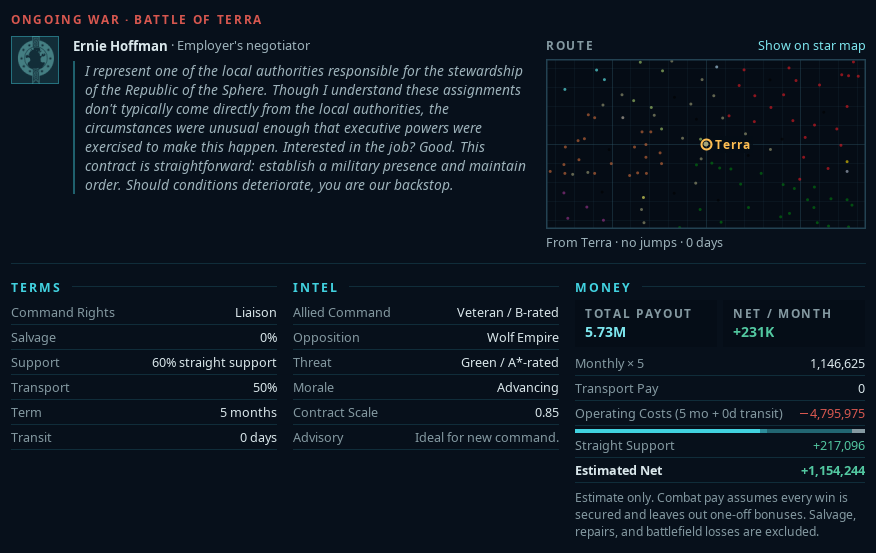
Mercenaries wanted. Where will your story take you?
Personnel
- Added a new ‘cheat death’ mechanic. Characters with Edge (spent or unspent) who would die instead permanently spend a point of Edge to avoid death. A new option goes with it that gives all founders a single point of Edge.
- All skills can now have Natural Aptitudes, not just combat skills. This brings our skills into full compliance with ATOW. Existing characters will be grandfathered in.
- Added the Chassis Familiarity mechanic, which lets characters build skill in piloting or repairing specific unit chassis.
- You can now equip your personnel with skill-improving toolkits and armor, which makes it quick to swap armor kits for infantry. Sidearms will be supported in 0.60.00. See Boots on the Ground → In Your Campaign.
- The romance and reproduction system now supports same-sex couples adopting children.
- The romance and reproduction system now supports single-father reproduction. This works the same way as single-mother reproduction and represents a character taking custody of a child they had outside the campaign (for example, through a local sex worker or a one-night fling).
Medical
- Doctors with levels in MedTech/Any now reduce their patients’ injury penalty, making healing more reliable.
- Doctors with levels in Tech/Cybernetics now reduce their patients’ implant penalty, making healing of cybernetically enhanced characters more reliable.
Units & Logistics
- Added the ability to fabricate replacement parts and ammo, following the rules in CamOps. This represents a tech using a machine shop to make a custom, ad-hoc replacement. It does not represent a factory production line.
- Added automatic tracking of unit history. It works like the personal logs characters already have, but for units.
Roleplay & Reference
- Added a fully functioning roleplay engine with an in-game journal. You can use the oracle system to drive roleplay in your campaigns, and the journal gives you the tools to record your adventures.
- Added the Warrior’s Almanac, with a new issue every year! It gives you one place to see what technology was introduced, or went extinct, in the current game year.
Improvements
StratCon & Scenarios
- Completely overhauled StratCon, adding new mechanics and improved sector generation.
- All combat roles now work differently. Please see the in-game Glossary for more information.
- All scenario templates have been completely rewritten, fixing numerous bugs. We also now have a working template writer, so future fixes will be easier to roll out.
- The much-maligned morale mechanics have been reviewed and updated. They should be more interesting to play with now and produce fewer illogical results. Please see the in-game Glossary for more information.
- Added several new sources of ‘equipment bonuses’ to Advanced Scouting. Please see the in-game Glossary for more information.
- Based on player feedback, the StratCon mechanic ‘required combat elements’ has been removed.
Personnel
- Removed administration specializations. Admin/Logistics, Admin/Transport, etc., are all gone. There are now just Administrators, and every administrator can do every admin job. This may leave you with far more admin characters than you need.
- Added the ATOW skill ‘Piloting/ProtoMek’ and the ATOW tech specialization skills. In both cases, existing characters will be grandfathered in. These changes mostly prepare for the character builder scheduled for 0.60.00. With the tech skills, the intention is that you specialize your characters rather than making every character an omni-tech.
- When a character comes back from leave, such as maternity leave, they are automatically returned to their original unit (if their seat is still available).
- Added a campaign option to hide random personality descriptions. There are two settings: one removes random personalities entirely, and the other shows only the traits, such as ‘Aggressive, Passionate’. We have an ongoing project to rewrite all personality descriptions, but it wasn’t finished in time for the 0.51.01 launch.
- Updated the family tree to better handle large campaigns.
Medical
- New advanced surgeries have been added. Permanently fractured bones will no longer cripple your command!
- Improved the process for repairing broken hips and shoulders. Overall, dealing with broken limbs should be far less painful.
Units, Repairs & Logistics
- Added the option for infantry platoons to be maintained, repaired, and refit by mechanics instead of by themselves.
- Added a ‘careful salvage’ option. It makes salvaging wrecks take much longer, but it greatly reduces the risk of accidents.
- When traveling, any unused unit bays are now converted into cargo capacity.
- Units bought from the Employer Market are now delivered instantly.
- The unit market now sells small craft.
- Refits can now use equipment from after the current year when Limit Tech Purchases by Game Year is off. The setting was being ignored.
- Aerospace heat in MekHQ’s built-in refit lab now shows the same estimate as MegaMekLab.
Interface & Performance
- Numerous memory leaks have been found and fixed.
- Numerous UI improvements. We’ve started experimenting with a new ‘modern’ style. It is far more powerful than our old interface setup and makes things like in-app tutorials possible. It will take a couple of releases to finalize everything, so please be patient and give constructive feedback where appropriate.
- Tables remember up to three levels of sorting, such as rank, then profession, then name, the next time you start MekHQ.
- Added numerous new Glossary entries, and the contents of all Glossary entries have been validated for this release. All documentation is now searchable in game.
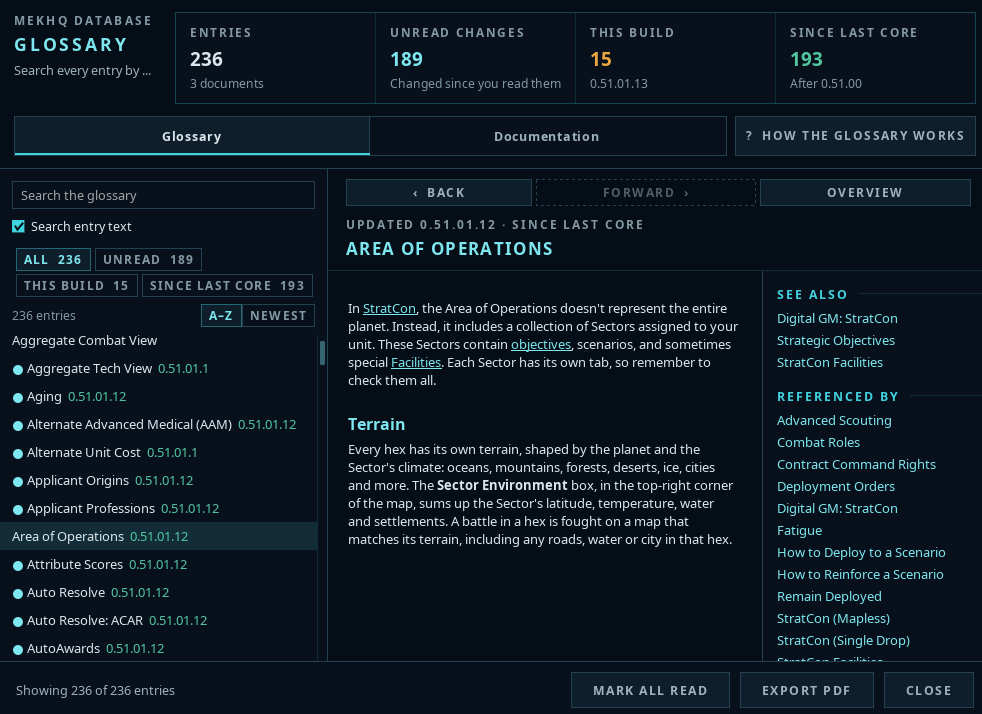
Find your way. All documentation is now searchable in game, and checked for 0.51.01.
Setting
- Added a non-canon end date to certain Dark Age bioweapons so that the Core Worlds are no longer a constant, plague-ridden mess. The MekHQ team highly doubts these bioweapons will ever be revisited in canon, but if they are, the dates can be updated to match.
Bug Fixes
Personnel
- Fixed the ‘curse of blandness’ that caused all personnel to generate with default attributes and traits.
- Fixed Veterancy awards not being issued correctly. Any character who was eligible for a Veterancy award but didn’t get one in 0.51.00 will receive it the next time they improve a skill.
- Adding a minimum complement and bulk hiring now both generate characters at the correct skill level when a specific skill level is requested.
- Reluctantly fixed the beloved ‘doctor baby’ bug. It will be missed.
Parts, Repairs & Logistics
- A massive rules compliance pass was done on all parts, repairs, and refits. More improvements are planned for 0.60.00.
- Parts will no longer be incorrectly flagged as ‘damaged beyond repair’. A part can still be damaged beyond repair, but only through failed repair checks.
- Fixed small craft being ignored by the resupply system.
- Procurement personnel no longer waste procurement attempts on impossible tasks.
- The Parts In Use dialog no longer forgets player changes.
- A custom DropShip with a two-door insulated cargo bay no longer arrives with one door already damaged.
- Quarters bays each get their own number, instead of every one showing as “1st Class Quarters Bay #0”.
Clans
- Fixed the Clan bidding system. Clans were underbidding by a wide margin, which made them easier than intended.
- The batchall breach warning no longer loops endlessly until you break the batchall.
Experimental Features
- Early in the 0.51.01 development cycle, we added the ability to establish ‘planetary bases’. This is our first step toward letting you split up your campaigns. Planetary bases are locations where you can store people, units, and parts. Unfortunately, the developer working on planetary bases went on hiatus partway through 0.51.01, so this feature should be considered experimental and likely has bugs. Notably, very few of MekHQ’s systems have been updated to account for it. Another developer has already agreed to update the system in 0.60.00, so it will be finished. For now, though, it is experimental.
- As part of the new Command Generator, we added the ability to create ‘support teams’, which lets you add your support personnel to the TO&E. Because of the way it works, the MekHQ team expects some minor issues. They should be smaller than the ones with planetary bases, but don’t be surprised if we patch it a couple of times after launch.
Data, Licensing & Canonicity
MegaMek, MegaMekLab, MekHQ and MekBay are an unofficial, fan-created implementation of BattleTech. They are not a canon source of BattleTech material.
That’s why the programs show a licensing window the first time you start a new release, and why the unit selector lets you filter for canon units and for units with a published record sheet. A unit’s canon status comes from the sourcebooks it lists, not from a setting someone flipped by hand.
For the full story, including canon versus official, our data moratorium and what it means for MekBay, and how our Alpha Strike values relate to the Master Unit List, see Java 21, Version 0.51.0, and a Few Words on Our Data.
Reporting Bugs Has Changed
All three programs now have a bright red Report a Bug button. In MegaMek it’s on the command strip, in the Commands menu and in the error dialog. In MekHQ it’s on the campaign control panel, and MegaMekLab has one too.
Reporting a bug, start to finish.
- One click packs up everything we need: every log, the autosave and the minimap images, in one zip. Your login name, PC name and IP addresses are hidden. The log now also lists your CPU, GPU and RAM.
- The GitHub form comes pre-filled, and the last 10 sessions of logs are kept.
- Rules questions go to the official Catalyst Game Labs forums. One important note: CGL has announced they’re no longer answering rules questions about the Total Warfare book.
What’s Coming has more on the new bug reporting.
A reminder about the trackers
Shortly after 0.51.01 is released, we’ll be closing all the old issues on the MegaMek and MegaMekLab trackers that predate 0.51.0. If one of those bugs still happens to you, please report it again with Report a Bug.
Going forward, issues that aren’t submitted using Report a Bug may be closed at the developer’s discretion. This is a new practice. It lets us keep the trackers under control, and gives us a much better picture of which bugs are active and current.
Thank You
As we look ahead to 2027, MegaMek turns 25. If you think about it, that’s quite the milestone: a program that’s been around for a quarter of a century.
For my part, I made my first contribution to MegaMek in 2011 and became a developer in 2013. I still have a copy of MegaMek from 2002. It doesn’t run on modern Java any more, but I still think back to those days, when about all you could really do was walk a Mek around a field. Then I look at where MegaMek is today. And remember the programs that grew out of it, MegaMekLab and MekHQ. Both of them have changed the way players interact with the BattleTech universe.
We have a lot of exciting plans. Some of the interface changes you’ve seen in MekHQ will gradually come to MegaMek over the coming years, and MegaMekLab will become more like MekBay.
Before we go, I want to say thank you.
To our developers. Six months, more than 7,000 commits and about a million lines of code, written by volunteers on evenings and weekends, around jobs and families. That’s an incredible amount of work, and it shows in every corner of this release.
To our Test Pilots. You ran the Experimental builds so everyone else didn’t have to. Every bug you found, reported and retested is one that won’t land on a player on release day.
To our contributors. Everyone who opened a pull request, fixed a unit file, wrote documentation or helped someone on Discord. A lot of this release started with someone outside the core team saying “I can fix that.”
And to our players. Thank you for sticking with us through a long cycle. For the bug reports, the feedback, the patience, and for playing. You’re the reason we do this.
And a special thank you to the developers of BattleTech, Catalyst Game Labs, the current keepers of the universe. Without their work, we’d be nothing but a jumble of code. We’re glad to bring their imagination into a digital way to play and enjoy the universe.
So whether you’re just discovering the programs or you’ve been with us since the beginning, thank you. MegaMek is more than just a program. It’s a community.
Hammer
Technical Stuff
The Launcher Handles Java For You
The easiest way to get 0.51.01 is the MegaMek Launcher. It installs and manages Java for you, so if you use the Launcher, you can skip the rest of this part. Just remember to update the Launcher whenever it asks.
Installing by Hand: Java 21 Is Still Required
We strongly recommend you avoid installing by hand and use the new Launcher instead. But if you have to install from the archives (see Manual Install on the Installing and Updating page), for a server, say, or for your own reasons, Java 21 is still required. Our guide to Updating to Adoptium (Eclipse Temurin Open Source Java) uses Java 17 as the example; simply select Java 21 instead during installation. Everything else in the directions remains the same.
It’s crucial to read the directions carefully, especially Step 6, which covers a recent change to the Adoptium installer. Make sure to select “Install for all users of this machine” in the Installation Scope.
If you choose to use a Java version beyond 21 that isn’t officially supported, our standard response for issues will be to revert to Java 21.
WARNING: If you are running on an older 32-bit OS, DO NOT INSTALL JAVA 24 or later, as they have officially dropped support for 32-bit Windows.
Which Build Am I Running?
Check the version under the logo, and the Core or Experimental stamp next to it.
Running a Dedicated Server with Docker
Want to host your own MegaMek server? Docker images for MegaMek dedicated servers support user folders for custom content. For setup instructions, visit the Docker guide on MegaMek.games.
Upgrading Your MekHQ Campaign
Good news: the old step-by-step upgrade instructions are gone. Everything is now handled in game or by the Launcher. As long as your campaign was saved in 0.51.00, you can upgrade it without issue. MekHQ even backs up your campaign for you now.
A Few Reminders
Core and Experimental Releases
The old Nightly, Development and Milestone releases are gone. There are now just Core releases, for everyone, and weekly Experimental releases, for our Test Pilots. See A New Release Rhythm above, or the Launcher post.
This Cycle’s Posts
If you haven’t read them yet, here’s everything we posted in the run-up to 0.51.01:
- The Command Generator
- Princess and CASPAR, Round Two
- Balancing Gameplay & Economics
- The MegaMek Launcher
- Boots on the Ground
- Objectives and Victory Points
- The Contract Overhaul Project
- What’s Coming in 0.51.01
- 2026 State of the Universe
User Data Directory
We have a customizable User Data Directory feature that allows you to set a single external directory for storing game resources like units, camos, and fonts, accessible across different installations and versions.
You can now manage it right in the Launcher: set the User directory in the Launcher’s Settings, and every installation shares it. We strongly encourage you to set one up. You can still set it in client settings too, though a game restart is needed for changes to take effect.
Social Media
Join our official MegaMek Discord, our primary community hub for the suite. We offer voice support, individual channels, and assistance for the official public servers. We’re also part of community Discords Everything BattleTech and Classic BattleTech. Find us on Facebook at MegaMek BattleTech and MegaMek.
Contributing
Interested in contributing? Find out how here.
Change Logs (Release Specific) and Download Links
Get 0.51.01 through the MegaMek Launcher. It installs and updates MegaMek, MegaMekLab and MekHQ for you.
MegaMek Change Log
Full Changelog: View on GitHub
Release on GitHub: MegaMek 0.51.01.14
Download MegaMek 0.51.01 with the Launcher
MegaMekLab Change Log
Full Changelog: View on GitHub
Release on GitHub: MegaMekLab 0.51.01.14
Download MegaMekLab 0.51.01 with the Launcher
MekHQ Change Log
Full Changelog: View on GitHub
Release on GitHub: MekHQ 0.51.01.14
Download MekHQ 0.51.01 with the Launcher
Seyla!
Intercepted transmission
One More Thing…
Tco ss i httenx eso fMgMki on ob .00t adei.
 trigyoni obgta h etvrino eae sgigt e06. ohnl t -Saln