Hi Everyone!
Welcome to version 0.51.0! As we mentioned in yesterday’s blog post, this is a big one. Across all three programs we’ve merged over 400 pull requests in the last couple of months, packed with a lot of interesting work. We’ll get into the details below.
Before we do, one important call-out: if you didn’t read yesterday’s blog post, you really should. It covers the details on why Java 21 is now required for this release. If you did read it, thank you. You should be ready to dive into the release notes below.
A heads-up on release status: 0.51.0 is a Development release, not a Milestone. With a new Java baseline and an unusually large volume of changes across the suite, expect some rough edges while everything settles and stabilizes.
Team News
After taking some well-deserved time away from the projects, Illiani has returned.
We also have a new developer joining the team. We’d like to welcome @AlitarSemiramis (Vicente) to the Dev team! They’ve been an outside contributor for a few years, so we’re glad things have finally lined up to make it official. Their first big project with the team was the new in-game planetary system editor. You’ll get to read all about that in the MekHQ section below. They’ve also been knocking out fixes and working on more that we can’t wait to show you. Please make them feel welcome!
If you’ve caught any of Illiani’s recent streams (and if you haven’t, they’re worth checking out on YouTube or Twitch if you want to see the secret sauce). She streams every day except Wednesday during the week, plus Friday nights, when you can catch the epic battles of the Scrotorius Basterds. You’ll also get a preview of her future projects!
We also have a few new contributors on MekHQ who are already making a profound difference in the look and feel of the UI.
Note: These release notes highlight key changes in this version. This is not an exhaustive list. For a full breakdown, see history.txt in the docs folder for each project or the change log section at the bottom.
MegaMek
New Features
FrankenMeks
FrankenMeks have arrived. These cobbled-together ‘Meks, rebuilt from salvaged and mismatched parts, are now both buildable in MegaMekLab and fully playable in MegaMek. Worth a heads-up: the tabletop rules for these units are vague and have a few gaps, and we expect we’ll need clarifying errata from Catalyst. Consider this implementation a bit more beta than usual. Construction in particular is unstable right now, especially around mixed structure and jump jets, and existing designs may be invalidated by future changes.
New Rules from the Manuals
- Mountain Troops: The Mountain Troops infantry rules from TO:AUE (p.153) are now implemented, giving specialized mountain infantry their proper behavior. The full climbing rules aren’t included yet.
- Chainsaw & Dual Saw: Chainsaws and Dual Saws now function per TO:AR — clearing woods, dealing bonus damage against buildings, and adding bite to vehicle charge attacks.
- Ghost Targets: Ghost Targets are now implemented to the correct Tac Ops: AR rules (p.100), with a UI for units carrying multiple ghost-target systems, lobby mode selection, and a comms tonnage check. Heads-up: in multiplayer games, ghost targets can slow play down.
- Geysers and Line of Sight: Geysers now factor into line-of-sight calculations, a terrain interaction that wasn’t implemented before.
Board Toast Notifications
A new toast notification overlay puts in-game alerts directly on the board, making important events much harder to miss.
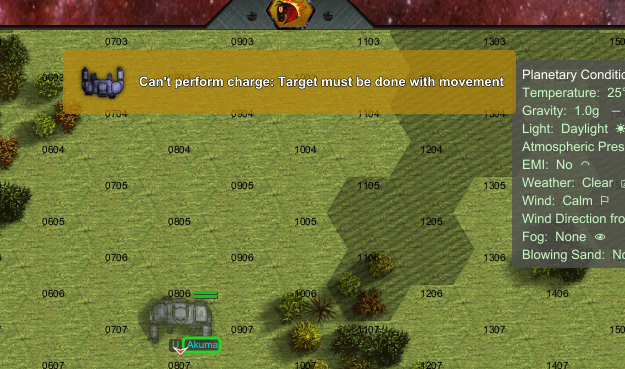
In-game board toast notifications (click to enlarge)
Improvements
Ruler & Line-of-Sight Tool
Building on the elevation cross-section work from 0.50.12, the Ruler/LOS tool gets further refinement: the LOS elevation diagram and ruler have been reworked, POV labels and compare-table headers now show chassis names, and the LOS line is now aware of the active ruler mode.
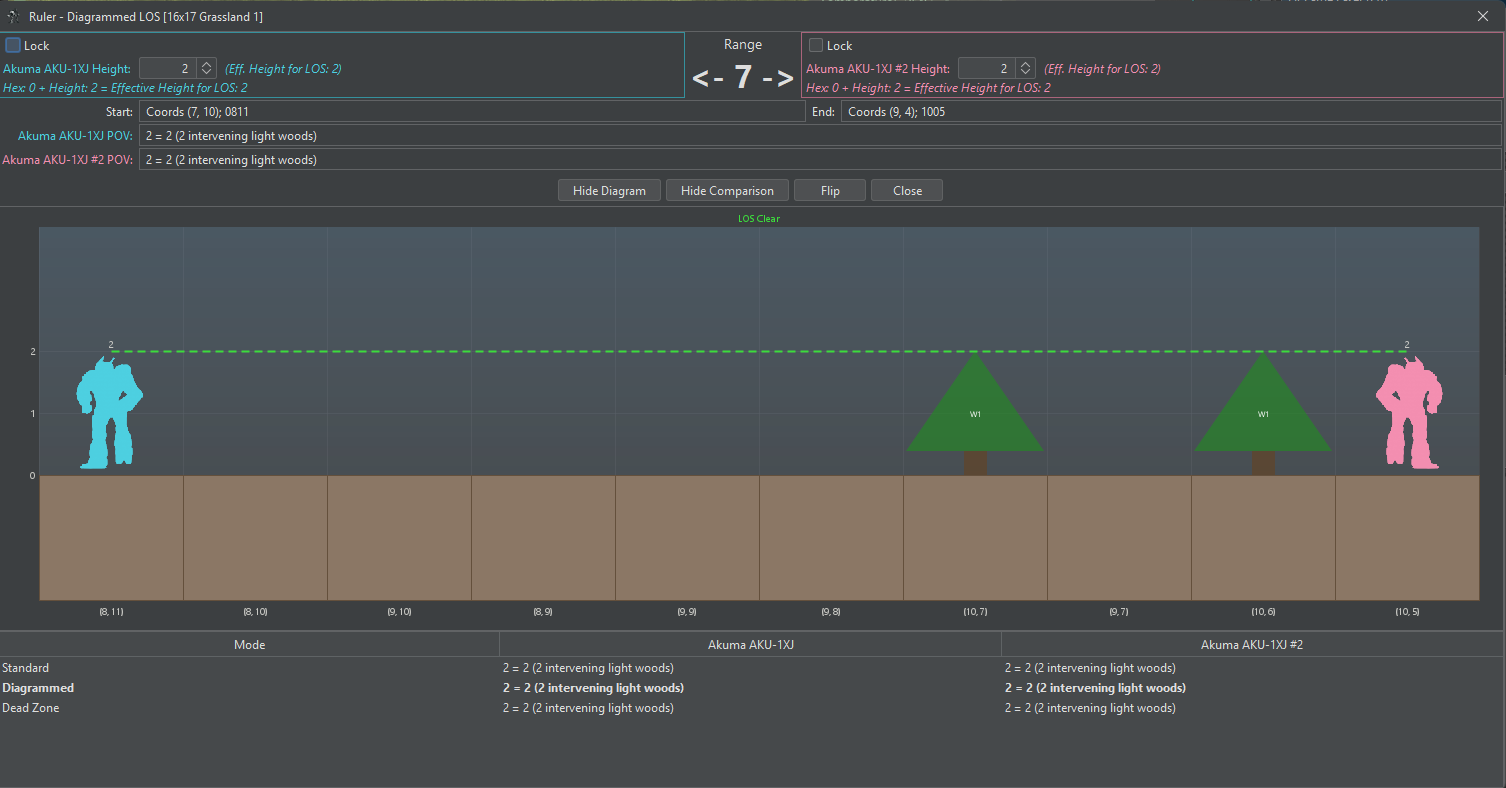
The reworked Ruler and line-of-sight tool (click to enlarge)
Lobby & Deployment
- Searchlights: The searchlights default has moved into game options, and you can now turn searchlights off directly in the lobby.
- Battle Armor Manipulators: Battle Armor manipulator selection is now available in the MegaMek lobby.
- Mine Deployment: A round of mine-deployment UX fixes — clearer tooltips, a sensible density default, better sizing, and corrected labels.
- Equipment Choice: The lobby unit-configuration dialog got a cleanup pass:
- Sections now have headers, and the equipment choosers line up across them.
- Miscellaneous checkboxes such as DNI are grouped into their own section.
- The dialog now uses left-side tabs, which is new for MegaMek.
- Ammo selectors with only one possible choice are now disabled.
- You can flip between units with Alt+Left/Right.
- The lobby ammo-dump checkbox is hidden since its purpose was unclear; you can simply set ammo to 0 instead.
- It also fixes mixed-tech units that were showing empty ammo selectors for opposite-tech-base ammo, such as the Atlas III AS7-D3 and Harvester Tripod.
The reworked lobby equipment dialog - click play to start
Rules Refinements
- Neural Interface: The neural interface tracking option is now a three-state game option (Off, Pilot Only, or Full Tracking), so you get finer control over how it’s enforced.
- EMI / ECM: The EMI ECM-range doubling effect now applies to ground units, both on the display and in effect.
Bug Fixes
Movement & Terrain
- Grounded DropShips: Grounded Spheroid DropShips no longer have run MP. They were never meant to sprint.
- Infantry Jumping: Infantry can no longer jump into positions higher than they should reach, and terrain elevation is now properly accounted for when jumping into a building.
- Bridge Textures: Fixed bridge textures obscuring hex text and improved the default building text color.
Combat & Damage
- Crippled Calculations: Fixed crippled-damage calculations for bomb-mounted weapons and gyro/engine hits.
- Building Cover: Units no longer receive reduced damage when they aren’t actually inside a building.
- C3 Networks: Fixed a crash when a C3 master is jammed while the slave line is still clear.
- Cluster Artillery: Improved the cluster artillery logic for when damage doubles.
- iNarc Pods: Brushing off iNarc pods now actually does something.
- Mek Mortars: Mek mortar ammo has been added to the “no aim” list.
- Marine Casualties: Marine point damage converted into casualties now rounds down.
- Initiative Compensation: Tie rerolls now correctly send the initiative-compensation flag.
Infantry
- Damage Report: The infantry damage report is now complete.
- TRO Readout: Fixed the missing trooper count in the TRO infantry readout.
- Specializations: Fixed an NPE in the player-done packet and a bad flag check in infantry specializations.
Handheld Weapons
Handheld Weapons continue to receive stability fixes since their 0.50.10 debut:
- Handheld weapons no longer generate heat on the ‘Mek carrying them when attacking.
- Fixed an exception when a handheld weapon mounts Artillery Cannons.
- Entity readout and Battle Value now account for handheld weapons.
- Handheld weapons are no longer marked destroyed when saving to a MUL file.
Equipment & Units
- Enhanced LRTs: Enhanced LRTs and their ammunition are now in the game.
- Ammo Configuration: Restored ammo configuration options that had gone missing from the Equipment tab.
- Ammo Dumping: Ammo dumping status is now saved between battles.
- Battle Armor Ammo: Fixed BA slotless equipment failing to load ammo with a :Shots# suffix.
- LAMs: LAMs can no longer be loaded into Mek bays while in Air Mek mode.
- Unofficial SPAs: Removed three old unofficial SPAs that were breaking MekHQ.
- Mek Taser: The Mek Taser no longer counts toward a Targeting Computer.
- Bay Validation: Weapon bay validation now uses the design-spec ammo count instead of current shots.
- Omni ‘Meks & Actuators: Fixed handling for omni ‘Meks, heavy guns, and arm actuators.
- Turrets: Dual turrets now load correctly, and support-vehicle front turrets can again receive equipment.
Force Generation & Data
- Force Generator: Fixed the Force Generator engine and its UI.
- Formation Types: Corrected FormationType discrepancies so they match Campaign Operations.
- Clan Availability: Fixed Clan availability for early mixed-tech equipment.
- OpFor Ammo: OpFor ammunition selection now respects the campaign year, preventing anachronistic loadouts.
Crashes & Save/Load
- Reactive Armor: Fixed an NPE during a reactive armor crit when slots were empty.
- Bot Stealth: Fixed a Princess crash when toggling stealth against enemies with no position.
- Anti-Missile Systems: Added null-safety checks to AMS assignment.
- iNarc Saves: Fixed an error loading iNarc pods from saved games.
- Mac Main Menu: Resolved main-menu issues on macOS.
- Autoconfig Files: Fixed Autoconfiguration Data Files (.adf) not applying.
Visual & UI
- Wreck Sprites: Wreck sprites are no longer drawn above the unit layer.
- Hex Note Tooltips: Fixed hex-note tooltips.
- Team Overview: The team overview panel now accounts for the new unit types.
- Table Coloring: Tables now use automatic alternate row coloring.
- Report Handling: Blank reports are no longer mis-reported as missing.
MegaMekLab
New Features
FrankenMek Construction
The other half of the FrankenMek story: you can now build FrankenMeks directly in MegaMekLab, at the Experimental tech level, and take them into play over in MegaMek.
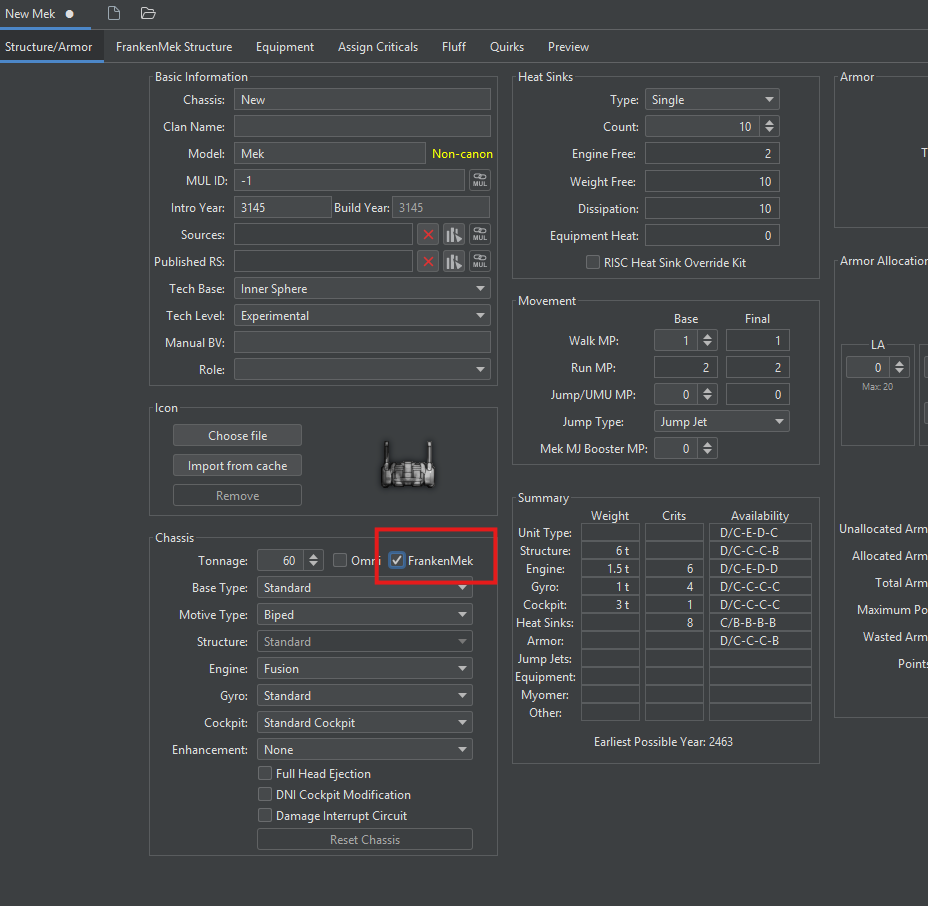
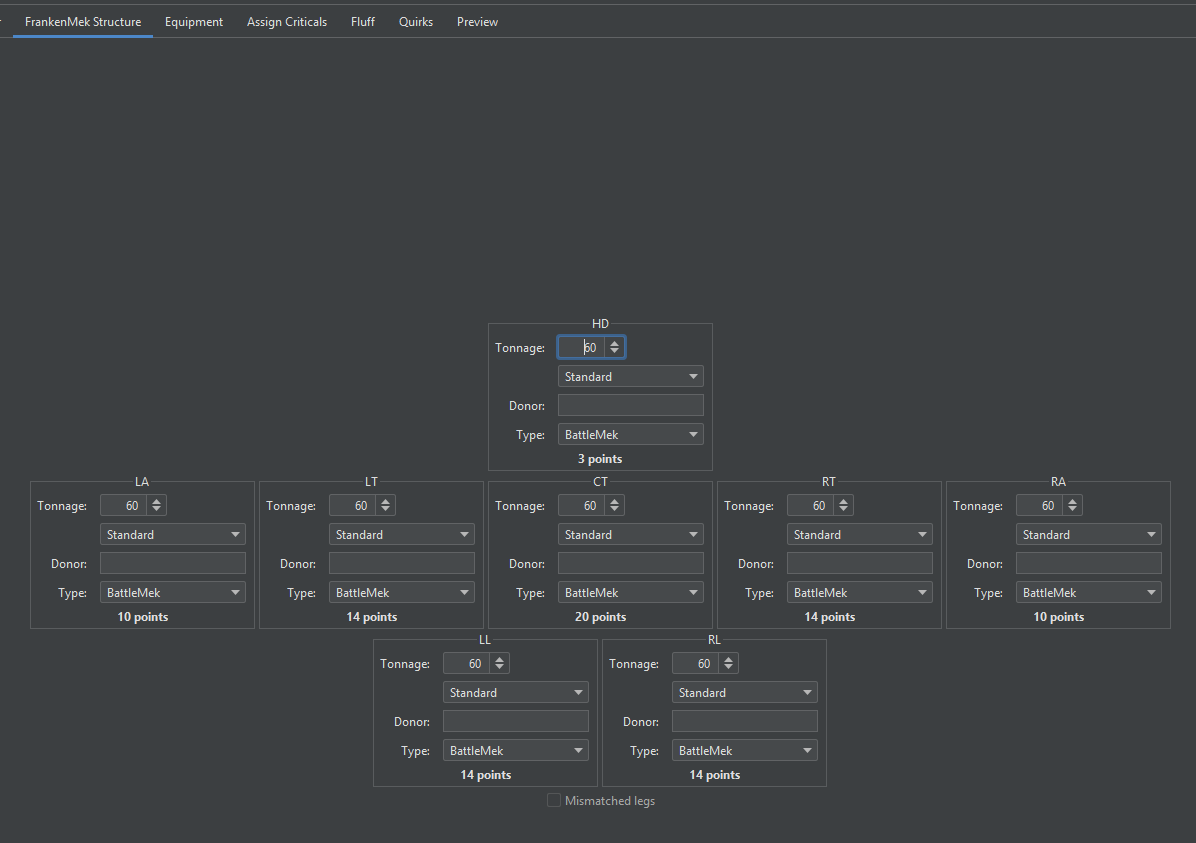
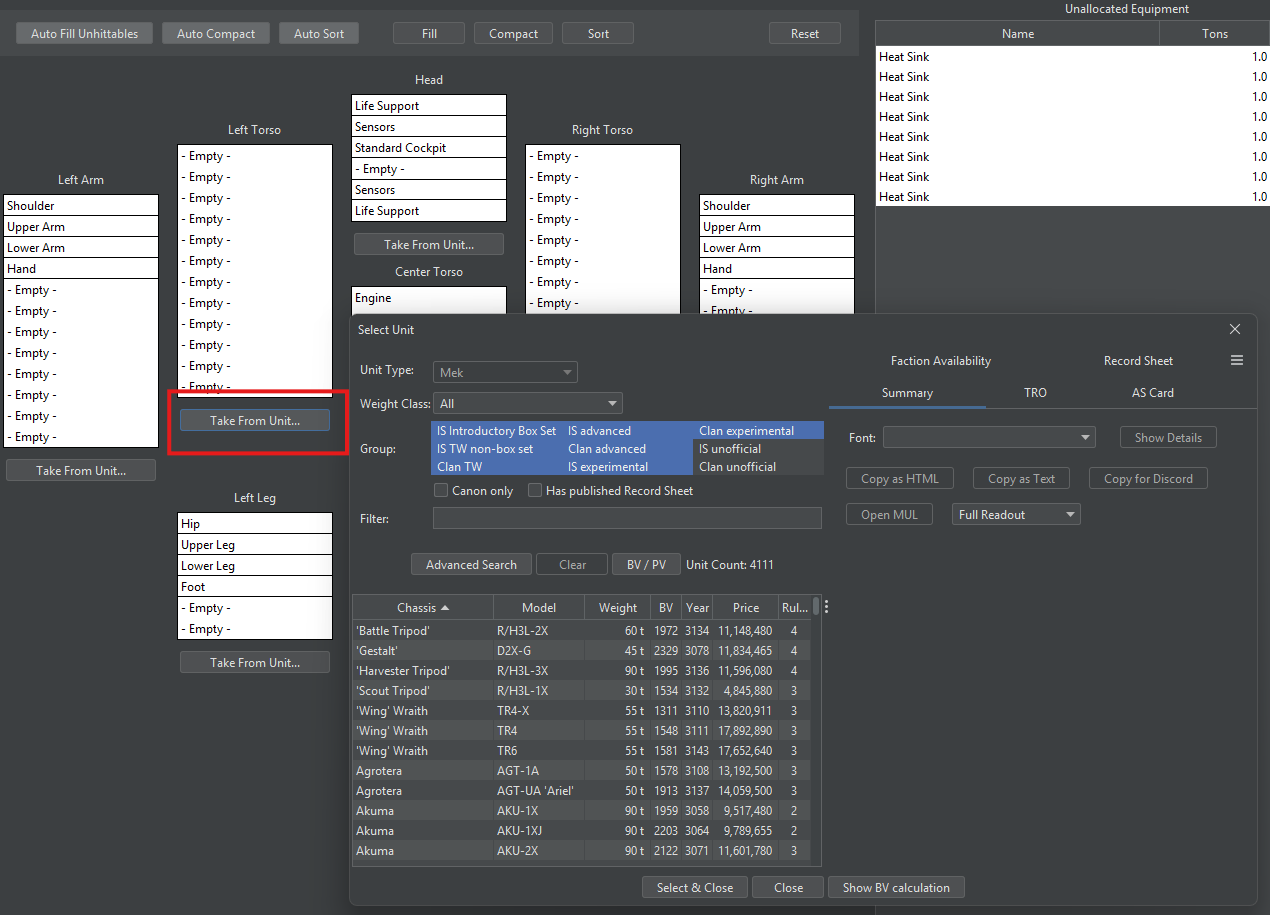
Building a FrankenMek in MegaMekLab.
Improvements
Construction
- Battle Armor: Battle Armor construction and manipulator handling have been improved.
- Vehicle Autofill: Autofill now skips invalid locations on Combat Vehicles and Support Vehicles.
- Rebuild Cache Button: Added a button to rebuild the unit cache from within MegaMekLab.
- Load Recent Units: You can now load recent units directly from the cache and from ZIP files.
Record Sheets & Data Display
- Hide Rules Level: A new option lets you hide the rules level on printed record sheets.
- Radical Heat Sinks: Record sheets now show the actual Radical Heat Sink (RHS) ability.
- Heat Display: The total generated heat display has been improved, with better accounting for jump jet heat.
- ProtoMek Frenzy: Record sheet damage calculations now account for ProtoMek frenzy.
- Screen Launcher: The Screen Launcher now appears in the equipment database.
Bug Fixes
- Cockpit Modifications: Fixed DNI, EI, and DIC cockpit modifications that couldn’t be removed once added.
- Armor Selector: Fixed the armor selector failing to refresh.
- Undo/Redo: Fixed structure slots after undo/redo.
- Mac Main Menu: Resolved main-menu issues on macOS.
- Table Coloring: Tables now use automatic alternate row coloring.
MekHQ
New Features
Planetary System Editor
This is the one you’ve been asking for, for years: an in-game planetary system editor. You can now adjust planetary ownership without hand-editing miles of XML. We don’t have player-driven planetary ownership yet, but this editor makes that a far more realistic prospect down the line. Keep an eye on this one; there’s plenty more to come.
The in-game planetary system editor
Tutorial: using the planetary system editor
Interface Updates
The MekHQ interface saw significant work this release, including a brand-new Briefing Room tab and an updated top panel. More is planned, including a significant rework to campaign options in a future release.

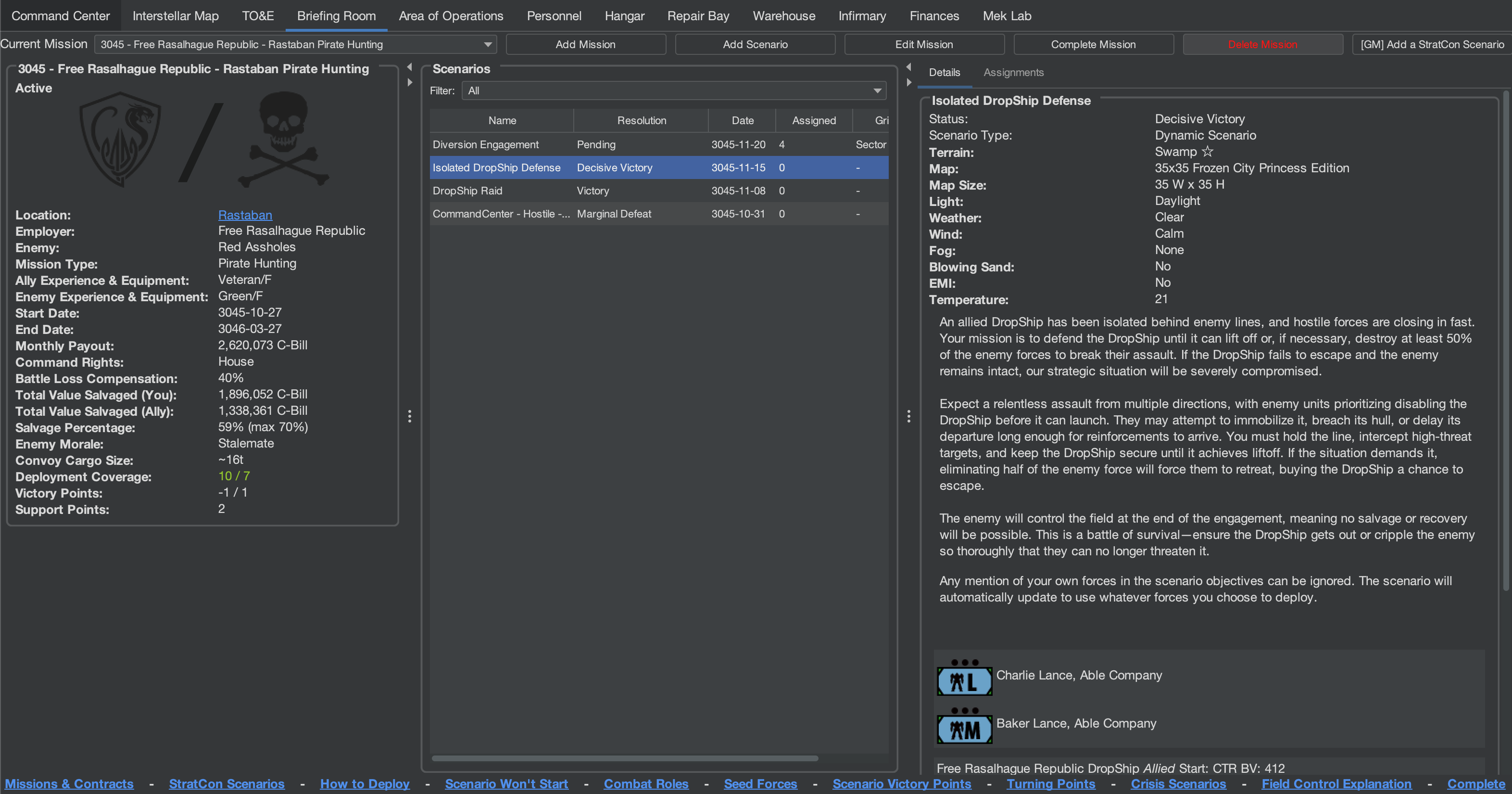
The updated top bar and the new Briefing Room tab (click images to enlarge)
Pity Contracts
Struggling early campaigns now get a hand up: the new Pity Contracts system guarantees a handful of easier contracts during your first few years, smoothing out the rough early game before your reputation has had a chance to build.
Improvements
Spit & Polish
Illiani’s main focus this release was the “Spit & Polish” project: a wave of quality-of-life changes aimed squarely at the day-to-day experience. Some of the highlights:
- Search Everywhere: Search bars have been added to the Personnel, Warehouse, and Hangar tabs, plus a search bar and filters on the Parts in Use report.
- Quick Train: Quick Train no longer trains utility and command skills unless you ask it to, and its client options have been improved.
- Procurement Priority: You can now see and change the priority of parts and units in the procurement list, so there’s no more cancelling every order just to grab a left leg in a hurry.
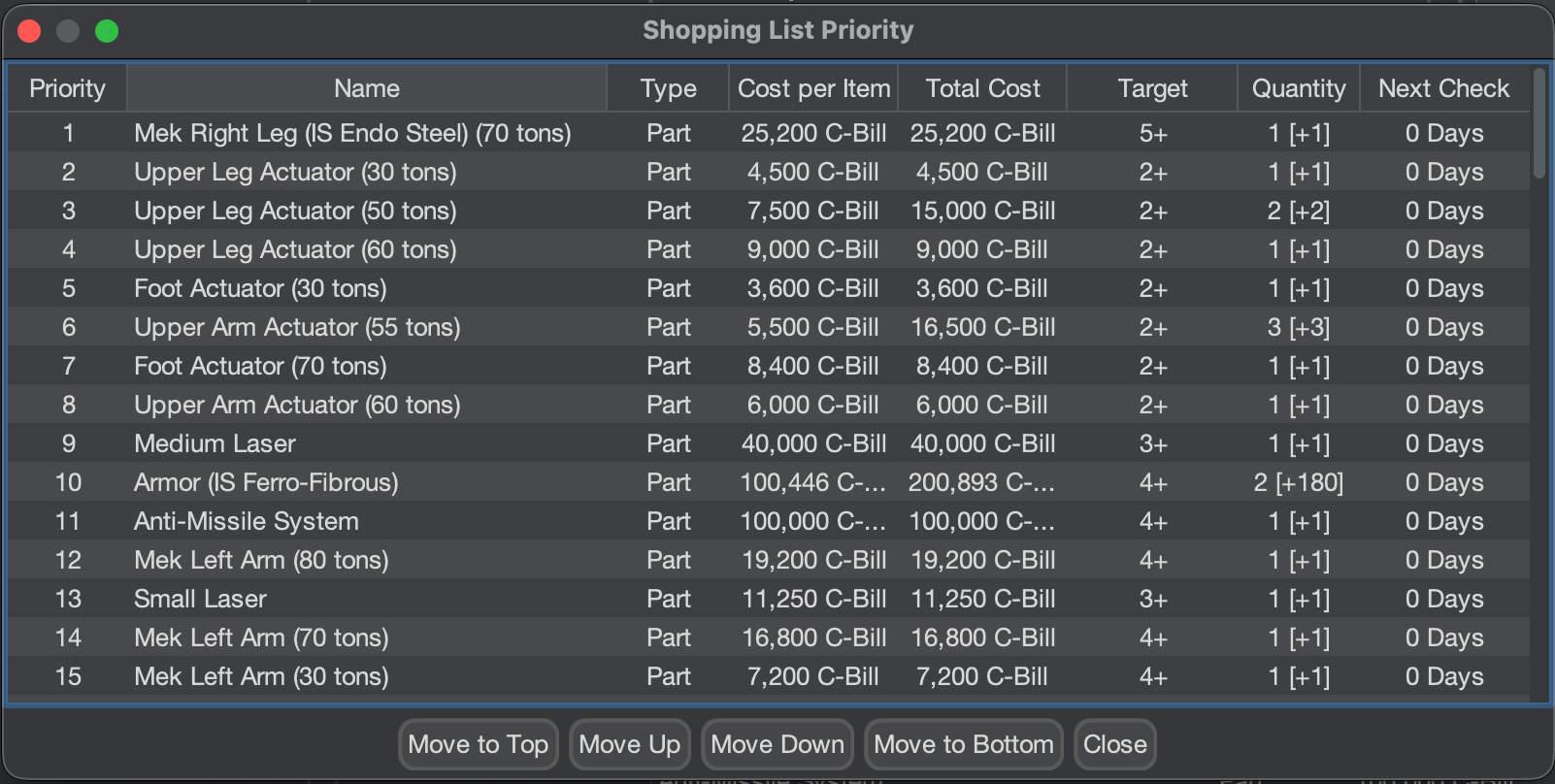
Setting procurement priority in the procurement list (click to enlarge)
- Children’s Portraits: Children no longer have portraits (optional), putting an end to newborns who look 45. Life is hard in the Inner Sphere, but not that hard.
- Veteran Awards: Veteran Awards are now less random (optional) and better matched to a character’s skills. Likewise, SPAs such as Sandblaster will no longer pick weapons that don’t exist yet.
- Free Units to TO&E: Free units from campaign options or the company generator are now automatically added to your TO&E formations, with techs and ranks assigned where appropriate.
- Mental Breaks: Mental Breaks have been significantly toned down, making Berserker and Catatonia far less punishing. Sorry this one took so long.
- Contract Terms: Renegotiated contracts are less punishing, and contract type generation has been adjusted for more variety, which is a real boon for late-game campaigns. High Connections and Negotiation on your campaign commander now directly improve starting contract terms.
- StratCon Facilities: Facilities have been significantly nerfed, ending the endless tide of enemy reinforcements and making airbase contracts considerably less painful.
Finances
- Net-Worth Graph: The Finance tab now includes a weekly net-worth graph, so you can watch your campaign’s fortunes rise and fall over time.
- Rental Costs: Rental costs now appear on the Finance tab.
Reporting & Views
- Aggregate Combat View: The Personnel tab gains an Aggregate Combat View for a consolidated look at your warriors.
- Aggregate Daily Report: A new client option adds an Aggregate Daily Report tab that gathers every daily report in one place, without disabling the other tabs.
Workflow & Display
- Quirk Tooltips: Quirks now have tooltips explaining what they do.
- Quick Tech Assignment: A new button gives you quick access to tech assignment.
- Unload Ammo: A new menu action lets you unload ammo from a unit.
Bug Fixes
This release brought a lot of bug fixes to MekHQ, far more than usual, touching nearly every aspect of play. The upshot is that 0.51.0 should be a noticeably more stable campaign experience. A representative sample of the bigger ones, by area:
StratCon & Contracts
- ACAR no longer always reports 100% loss odds in StratCon scenarios.
- Fixed StratCon “ghost objectives” left behind when scenario stubs disappear.
- Contracts are no longer generated for systems you can’t actually reach.
- Routed OpFors no longer generate scenarios when they have no forces left to field.
Salvage & Repair
- Fixed a long-standing salvage percentage rounding error.
- Units crewed by temporary personnel can now be salvaged correctly.
- Fixed customized infantry becoming unsellable and breaking saves.
Personnel & Medical
- Cybernetic prosthetics no longer count as injuries for turnover and medical discharge.
- Permanent diseases no longer spread while a unit is in transit.
- You can no longer perform endless surgeries on the dead, on account of them being dead.
- Fixed negative extra income causing campaign commanders to add funds instead of deducting them.
Transport & Units
- One-shot weapons can now be fired after reloading without needing to save and reload first.
- Fixed super-heavy vehicle bay transport reporting.
The full list is in the changelog at the bottom.
Data, Licensing & Canonicity
This release covers the player-facing side of a larger discussion about our data: what it is, what it isn’t, and how it relates to BattleTech canon. We went into that in depth in yesterday’s companion post. Here’s what you’ll actually see in the programs:
- Startup Licensing Window: On launch, the suite now shows a window laying out our licensing and stating plainly that MegaMek, MekBay included, is an unofficial, fan-created implementation and not a canon source of BattleTech material. Read it, click Acknowledge, and you’re on your way. There’s a “Do not bother” option, though a new release will bring it back by design.
- Canon Filtering in the Unit Selector: The unit selector now carries tri-state filters for “Canon only” and “Has published Record Sheet” — list everything, only the matches, or only the non-matches. A unit’s canon status is derived from its sources rather than set by hand, and the readout reflects that status at a glance.
- Multiple Sourcebooks: Units can now list multiple sourcebooks as references, which also feeds the canon-status logic above.
For the full story, including canon versus official, the data moratorium and what it means for MekBay, and how our Alpha Strike values relate to the Master Unit List, see the companion post linked above.
This release includes numerous additional fixes and under-the-hood improvements not individually listed here across all three programs. For a complete list of all changes, please refer to the change log section at the end of these release notes or visit the individual PR descriptions on GitHub.
Technical Stuff
Java 21 Required for 0.51.0
Starting with version 0.51.0, Java 21 is required to run the suite. This is the change behind the version bump out of the 0.50.x series. For the full rationale on why the version number jumped and what it means, see yesterday’s companion post.
The installation process is the same as the earlier move to Java 17. Our guide to Updating to Adoptium (Eclipse Temurin Open Source Java) uses Java 17 as the example; simply select Java 21 instead during installation. Everything else in the directions remains the same.
It’s crucial to read the directions carefully, especially Step 6, which covers a recent change to the Adoptium installer. Make sure to select “Install for all users of this machine” in the Installation Scope.
We continue testing against Java 25 and things look optimistic, but it will likely be later this year before we’re willing to commit to a full move. If you choose to use a Java version beyond 21 that isn’t officially supported, our standard response for issues will be to revert to Java 21.
WARNING: Java 24 was released (18 March 2025)! If you are running on an older 32-bit OS, DO NOT INSTALL JAVA 24 or later as they have officially dropped support for 32-bit Windows.
Running a Dedicated Server with Docker
Want to host your own MegaMek server? Docker images for MegaMek dedicated servers now support user folders for custom content. For setup instructions, visit the Docker guide on MegaMek.games.
Important: MekHQ Campaign Update Instructions
It is critical to follow these steps to ensure the integrity of your MekHQ campaign when updating between versions. Failure to follow these steps can result in the corruption of your campaign file.
Treat each release as stand-alone; Copy, never Move your data forward from older versions. MekHQ is NOT backward compatible.
- Make a backup of your campaign and custom files. This is a critical step to prevent data loss!
- DO NOT COPY MegaMek scenario saves or any preference file from a different version to avoid compatibility issues.
- Update MekHQ to the latest version. NEVER overwrite the existing folder; always keep each version in its own folder.
- Re-save any custom presets to ensure they are updated with the new version’s settings.
A Few Reminders
The Milestone System Summary
Please see this link for details on our Milestone release system.
State of the Universe & Development Updates
If you haven’t read our recent posts, we recommend checking out:
User Data Directory
We have a customizable User Data Directory feature that allows you to set a single external directory for storing game resources like units, camos, and fonts, accessible across different installations and versions.
Set up this directory via client settings. A game restart is required for changes to take effect.
Social Media
Join our official MegaMek Discord, our primary community hub for the suite. We offer voice support, individual channels, and assistance for the official public servers. We’re also part of community Discords Everything BattleTech and Classic BattleTech. Find us on Facebook at MegaMek BattleTech and MegaMek.
Contributing
Interested in contributing? Find out how here.
Change Logs (Release Specific) and Download Links
MegaMek Change Log
Full Changelog: View on GitHub
MegaMekLab Change Log
Full Changelog: View on GitHub
MekHQ Change Log
Full Changelog: View on GitHub
P.S. A note for students of the Jihad: yes, we’re shipping on the Sixth of June. No, the Manei Domini had nothing to do with this release, and any resemblance to a certain Word of Blake splinter cell is purely coincidental. Blessed be.