StratCon Guide
Understanding the StratCon system for single-player campaigns
StratCon Digital GM: StratConThe premier Digital GM system for single-player campaigns, featuring strategic objectives and area control.Click for full definition is the automated campaign system that acts as your digital GM for single-player campaigns. It generates scenarios, manages objectives, and runs your contract.
Terms with dotted underlines have glossary definitions—hover for a quick summary. View full glossary
Area of Operations
The Area of Operations Area of OperationsThe collection of Sectors assigned to your unit in StratCon, containing objectives, scenarios, and facilities.Click for full definition tab shows the strategic situation for your contract.
The Track
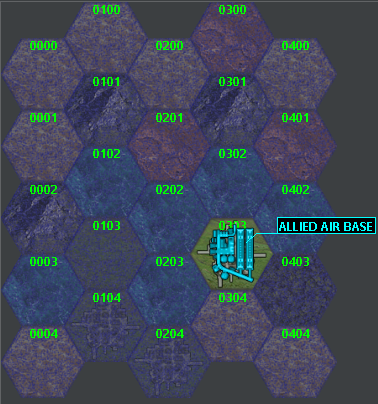
The main feature is the Track—a hex map representing your theater of operations. Each hex represents a large region or locality. The map shows:
- Terrain biomes by hex appearance
- Allied positions (blue symbols)
- Enemy positions (red symbols)
- Unscouted areas (shaded hexes)
- Objectives Strategic ObjectivesGoals you must complete during a StratCon contract, such as maintaining positive CVP or controlling facilities.Click for full definition and facilities
Combat Teams Combat TeamsCohesive groups of forces designed to fight together (Lance, Star, Company, etc.).Click for full definition
Combat Teams Combat TeamsCohesive groups of forces designed to fight together (Lance, Star, Company, etc.).Click for full definition are cohesive groups (like a Lance or Company) designed to fight together. Any force without child forces and containing at least one unit is automatically considered a Combat Team.
Force Designations ( Combat Roles Combat RolesStrategic designations that determine how forces behave in StratCon (Frontline, Patrol, Maneuver, etc.).Click for full definition )
When deploying forces, assign them a Combat Role Combat RolesStrategic designations that determine how forces behave in StratCon (Frontline, Patrol, Maneuver, etc.).Click for full definition :
| Designation | Purpose |
|---|---|
| Maneuver | Standard combat forces, easy to reinforce |
| Frontline | Breakthrough/defense forces; can deploy minefields and infantry in advance (uses Tactics skill) |
| Patrol | Recon forces; scout 7 hexes on deployment instead of 1 |
| Training | Forces using deployment time to train skills |
| Cadre | Training local forces (for Cadre Duty contracts) |
| Auxiliary | Support forces (artillery, airpower) that act as reinforcements |
| Reserve | Off-duty forces for repair and recovery; won't generate scenarios |
Strategic Objectives Strategic ObjectivesGoals you must complete during a StratCon contract, such as maintaining positive CVP or controlling facilities.Click for full definition
The objectives Strategic ObjectivesGoals you must complete during a StratCon contract, such as maintaining positive CVP or controlling facilities.Click for full definition panel shows your mission goals:
Contract Victory Points Contract Victory PointsAn abstract measure of your contract's overall strategic success. Most contracts require positive CVP.Click for full definition determine contract success. Earned by:
- Completing objectives Strategic ObjectivesGoals you must complete during a StratCon contract, such as maintaining positive CVP or controlling facilities.Click for full definition
- Winning scenarios
- Capturing/destroying enemy facilities
Represent employer assistance:
- Generated by Admin/Transport at start and weekly
- Used for reinforcements (min 1 SP)
- Used for mercenary auctions and hiring Ronin
Tracks enemy fighting spirit:
- Routed = Allied victory imminent
- Overwhelming = Difficult opposition
Video Tutorial: Support Points
Facilities
Facilities are bases and installations that provide bonuses to whoever controls them.
Allied Facilities
| Facility | Effect |
|---|---|
| Air Base | Allied aircraft participate in scenarios |
| Artillery Base | Allied artillery supports scenarios |
| Base of Operations | Defended by veterans, turrets, and commander |
| Comms Center | Reduces reinforcement TN by 2 |
| Data Center | Increases scan range by 1 hex |
| Early Warning Center | Reduces allied reinforcement arrival time |
| Industrial Center | Provides 1 SP/month |
| Mek Base | Allied meks participate in scenarios |
| Orbital Defense | Prevents hostile air operations |
| Space Port | Provides 2 SP/month |
| Tank Base | Allied vehicles participate in scenarios |
Enemy Facilities
Enemy facilities provide similar bonuses to OpFor. For example:
- Comms Center adds reinforcement modifiers against you
- Industrial Center makes enemies larger and better equipped
- Space Port increases enemy force size by 15%
Capturing Facilities
Deploy forces to an enemy facility to generate a capture scenario:
Capture
Eliminate defenders but preserve infrastructure
Destroy
Total destruction (denies the facility to everyone)
Reconnaissance
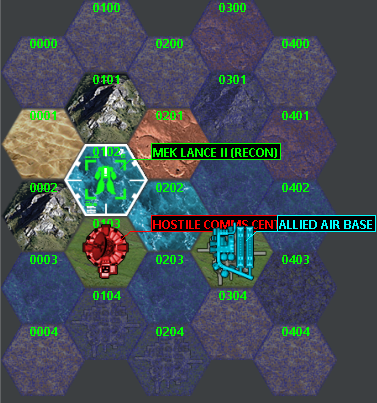
Scout unscouted hexes to reveal objectives and enemy positions.
Deploying Scouts
Right-click a hex on the track
Select Manage Deployment
Assign a force
Patrol Forces
Forces designated as Patrol are most efficient:
- Reveal the target hex AND surrounding hexes (up to 7 total)
- Only works when deployed to empty hexes
With Advanced Scouting enabled, revealed hexes depend on unit types and pilot skills.
Deployment Period
After deploying, forces need time to return:
- Deployment Period shown in objectives panel
- Force unavailable for other tasks during this time
- Salvage and injured personnel return immediately
Resupply and Convoys
Getting supplies during deployment is challenging—normal procurement takes weeks or months.
Employer Resupply
Periodic supply drops from your employer:
- Parts and equipment
- Ammunition
- Replacement personnel
Convoys
Use Convoy forces to transport supplies:
- Assign vehicles with cargo capacity to Convoy designation
- Convoys can be intercepted by enemy, generating combat scenarios
- Essential for moving SP-purchased items
Video Tutorial: Resupply and Convoys
Scenarios
StratCon generates scenarios (battles) based on your deployments and contract requirements.
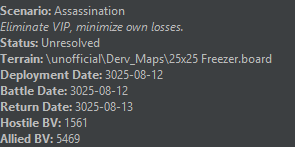
Scenario Information
Each scenario shows:
- Location (hex coordinates)
- Scenario type (attack, defense, recon, etc.)
- Weather and lighting conditions
- Objectives
- Enemy composition estimate
Conditions
Scenarios may have special conditions:
- Weather (rain, snow, fog)
- Lighting (night, dusk)
- Planetary conditions (gravity, atmosphere)
If your force commander has Tactics skill, you can attempt to reroll unfavorable conditions.
Deploying to Scenarios
Select the scenario in the Briefing Room
Assign forces from your TO&E
Review deployment requirements
Start the battle
Reinforcements
Call for help during difficult battles.
Calling Reinforcements
During a scenario:
- Costs minimum 1 Support Point Support PointsA resource representing your employer's willingness to support your strategic actions.Click for full definition
- More SP increases success chance
- Commander's Leadership skill provides bonus BV budget (500 BV per rank)
Reinforcement Arrival
Affected by:
- Commander's Strategy skill (reduces arrival time)
- Enemy facilities (Early Warning Centers delay you)
- Allied facilities (improve arrival time)
Interception
Reinforcing forces may be intercepted:
- Commander's Tactics skill reduces interception chance
- Intercepted reinforcements must fight their way through
Video Tutorial: Reinforcements
Battles
When a scenario is ready, you have several options:
Click Start Game to open MegaMek and play the battle yourself.
If played separately, save the game in MegaMek and load it in MekHQ.
Let the computer simulate the battle. Fast but less control.
Skip the scenario. May have negative consequences.
Resolution
After a battle completes:
Status Updates
| Update | Description |
|---|---|
| Unit Damage | All damage applied to your units |
| Personnel Injuries | Casualties and wounds recorded |
| Enemy Losses | Destroyed/captured enemy units |
Salvage
Select salvage from defeated enemies:
- Limited by salvage rights in contract
- Heavy/damaged items may be harder to recover
- Salvage forces improve recovery chances
Campaign Effects
- Victory Points adjusted
- Enemy Morale may change
- Facilities may change hands
- Turning Points may be completed
Contract Completion
Contracts end when:
- Time expires
- All objectives complete
- Enemy routed
- Your forces defeated
Evaluation
Your performance is evaluated based on:
- Objectives completed
- Victory Points earned
- Losses sustained
- Contract terms met
This affects: Payment received, Reputation change, and Future contract availability.
Continuing the Contract
Between scenarios:
- Return forces to Reserve designation
- Assign techs to repairs
- Treat injured personnel
- Resupply ammunition and parts
- Scout new hexes with Patrol forces
- Position forces to protect objectives
- Plan attacks on enemy facilities
Monitor:
- Victory Point total
- Enemy morale level
- Remaining objectives
- Time remaining