MegaMek, MegaMekLab, and MekHQ 0.50.12 Release Notes
Hi Everyone!
Welcome to version 0.50.12! It’s been about three months since the 0.50.11 Milestone release, and there’s a lot to cover.
First, a heads-up for those still on 0.50.11: after declaring it a Milestone, we discovered a nasty bug involving ECM and C3 interactions. That bug is fixed in this release. However, we don’t anticipate 0.50.12 achieving Milestone status. There are too many big-ticket items in MegaMek that will need time to settle and stabilize.
A Farewell to a Warrior
For those who haven’t been following, early in the new year Illiani left the projects. She was the primary MekHQ developer and a driving force behind MekHQ’s improvements over the last couple of years. As we announced on Discord:
It is with a heavy heart that I announce Illiani has departed the MegaMek project. Like Kerensky leading the Exodus Fleet beyond the Periphery, sometimes the most dedicated warriors reach a point where they must step away from the front lines. After years of tireless service, Illiani has made the difficult decision to leave. We wish her peace, rest, and fair winds wherever her JumpShip takes her next.
For those who don’t know the scope of what she accomplished: Illiani was a change agent in every sense of the word. She didn’t just contribute to MekHQ. She transformed it. Every system bears her fingerprints. Nearly 9,000 commits. The #1 contributor to the MekHQ codebase. The numbers alone don’t capture it. She elevated this program in ways that will benefit players for years to come.
I need the community to understand what this means going forward. Illiani was MekHQ’s primary developer. The pace of development, particularly major new features, will slow significantly for the foreseeable future. Our remaining developers will continue to address bugs and issues as they arise, but remember: this is a volunteer project, and developers work on what they choose to work on. The programs will continue. MekHQ will continue. But this is a significant loss.
On a personal note, I’m going to miss her. Her impact on this community was phenomenal. The door remains open should she ever choose to return.
BattleTech Core Rules: What’s Our Plan?
Catalyst has announced the new Core Rule Book, and we’ve been getting questions about how MegaMek will handle the transition. If you’ve been following along, you know we implemented the relevant Playtest rules in MegaMek as they were released. So what happens now?
The simple answer: we will be supporting the Core Rules. But we can’t start coding them until we have final versions in hand. That means we won’t likely have Core Rules support in any release until after GenCon, and it will take us a few months after that to implement everything.
As part of this effort, we’ll also be doing a general cleanup. If you’re not familiar with the concept of technical debt: it’s the accumulated cost of shortcuts, workarounds, and outdated code that builds up over time in any software project. Think of it like deferred maintenance on a DropShip. Skip enough scheduled overhauls and eventually systems start interfering with each other. MegaMek has this in spades. You can’t be a 23-year-old project and not have it.
So as we look at each new rule, our approach will be: implement the new rule, and keep the legacy rule as an option where we can. If we can’t keep both, the legacy option gets removed. I know this is going to upset some players, but we don’t have a lot of choice. There are limits to what a small volunteer dev team can support. We would love to support everything. We just can’t, and we have to take that into account with everything we do.
The good news is that a lot of the Playtest rules are already implemented, and in many cases we just need to reorganize things to convert them into the final rules. But there are also a lot of new rules and corrections to existing rules that we’ll need to incorporate. As we do releases, we’ll call out Core Rules changes as we go.
Note: These release notes highlight key changes in this version. This is not an exhaustive list. For a full breakdown, see history.txt in the docs folder for each project or the change log section at the bottom.
MegaMek
New Features
Advanced Buildings: Now Witness the Firepower
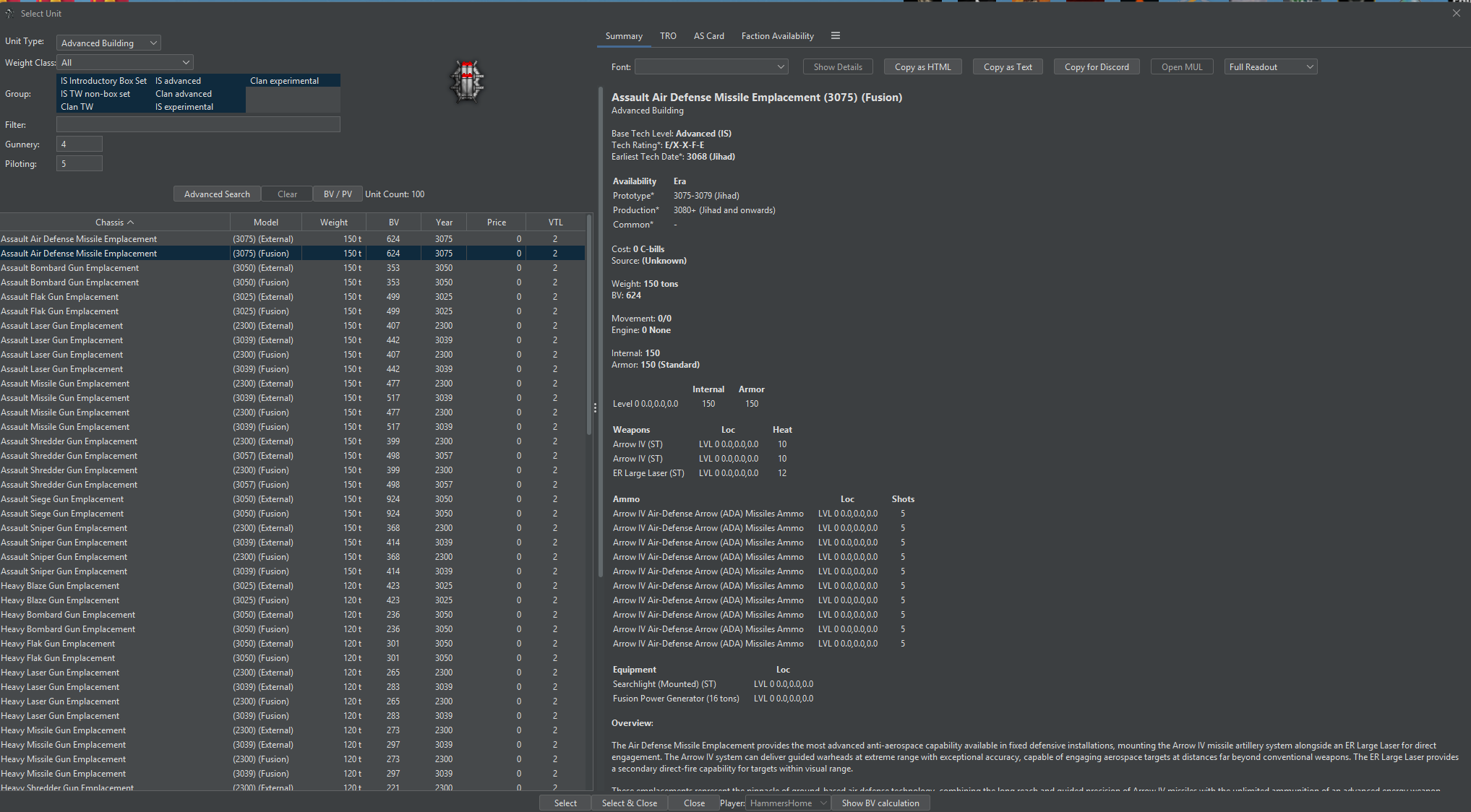
In 0.50.11 we laid the foundation for a multi-stage rework of how MegaMek handles buildings. Proper fortresses, functional turrets, gun emplacements done the right way. This release delivers on that promise. TO:AR Advanced Buildings have arrived in MegaMek, and they bring a complete rethink of how defensive structures work across the suite. If you’ve ever been frustrated in MekHQ base attack missions where the game expects you to either ignore or crew-kill those old legacy Gun Emplacements, this is the fix we’ve been working toward.
What’s New in MegaMek:
- Full Gameplay Support: Advanced Buildings are playable with BV calculations, toHit modifier display on the map, and integration into the force generator
- Princess Support: Princess can attack Advanced Buildings, deploy units to them, and use them tactically. No more hiding behind fortifications from the AI
- Building Sizes: Only single-hex buildings are currently shipped with MM-Data, but the underlying code technically supports multi-hex buildings
- No MML Support Yet: Advanced Buildings cannot be constructed in MegaMekLab at this time. That’s a future goal
Infantry vs Infantry Building Combat:
Breaching! While digging through TO:AR, we came across rules for “Infantry vs Infantry Combat” (TO:AR p.169-174), specifically the special case for inside buildings. This is now fully implemented.
If you (or Princess) move an Infantry unit (CI or BA) into a hex with a hostile Advanced Building, you’ll see a new action during the “Pre-End” phase to initiate infantry-vs-infantry combat. If there are any ongoing combats, a new “Infantry vs Infantry Combat” phase appears where players and Princess can order units to “Reinforce” or “Withdraw” following the rules in TO:AR.
Notably, your Advanced Building’s crew will NOT participate in combat unless you order them to “Reinforce” — the rules describe crew participation as optional. They’re taken prisoner if they don’t join the defense and lose. This lets you garrison your own emplacements and choose to use only the garrison for defense so your building doesn’t take hits. Damage is applied and reported during the end phase report.
What’s New in MekHQ:
- Campaign Option: A new campaign option lets you generate Advanced Buildings instead of legacy Gun Emplacements for base defense missions
- Scenario Objective Resolution: “Preserve” and “Capture” objectives now properly handle Advanced Buildings. A “Crew Killed” building counts as “Alive” for these objectives, which the legacy Gun Emplacements never handled correctly
Bug Fixes for Buildings & Infantry Combat:
- Victory Report: Advanced Buildings now display correctly in the victory report
- Crew Kill Tracking: Buildings with killed crews properly count as crew killed in after-action reports
- Dead Crew Targeting: Buildings with dead crews can no longer be targeted for new infantry-vs-infantry actions
- Reinforce Logic: Fixed reinforcement logic for infantry-vs-infantry building combat
- Casualty Calculations: Fixed incorrect casualty counts for infantry-vs-infantry combat
- Building Power Generators: Fixed cost, BV, and tonnage issues for building power generators
Prosthetics & Augmentations: The Word Made Flesh, Continued
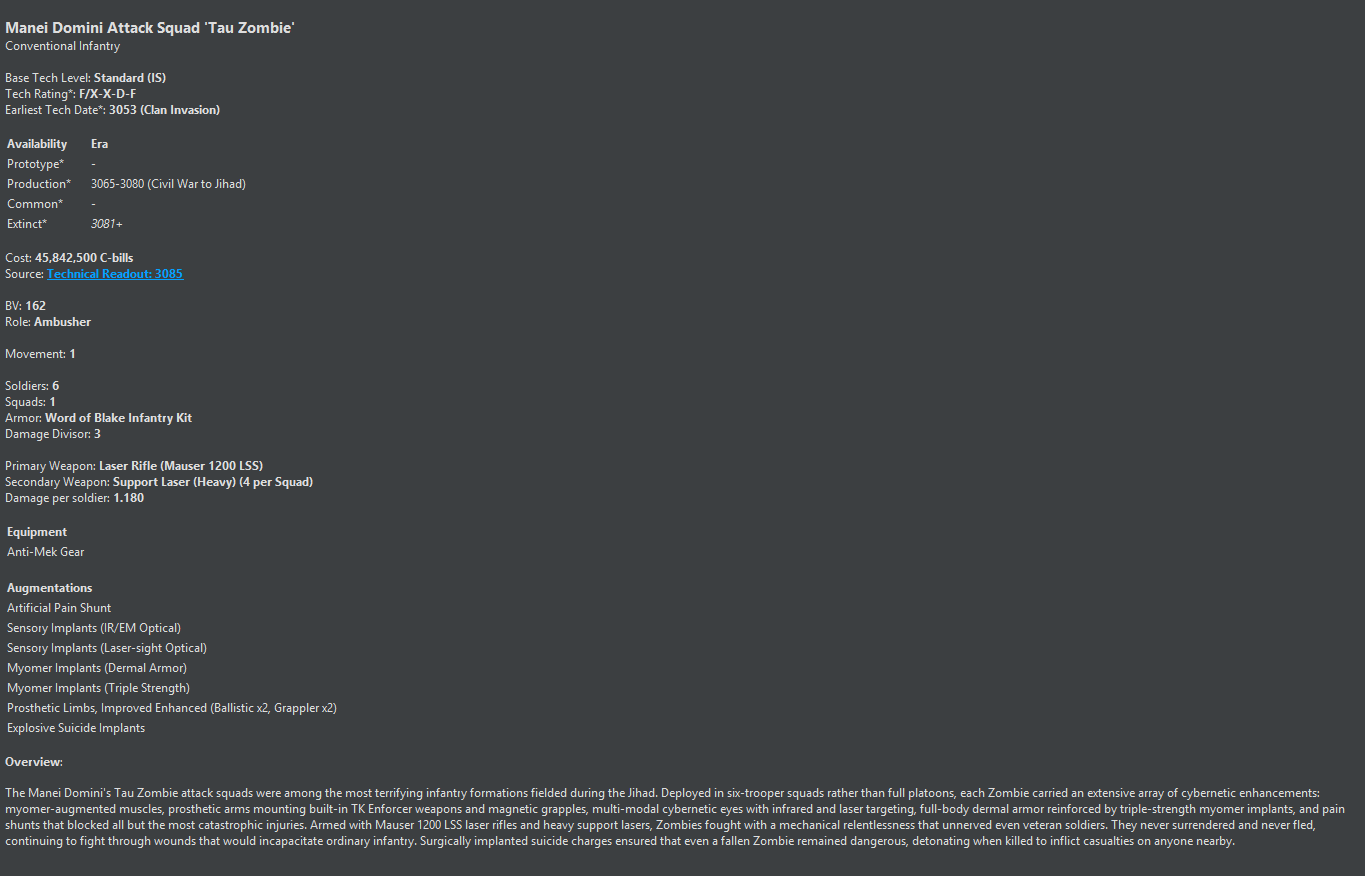
The Manei Domini’s work continues. Building on the significant cybernetic implant implementation in 0.50.11, we’ve expanded the Interstellar Operations augmentation catalog further, this time focusing on prosthetics for conventional infantry:
- Prosthetic Limbs Enhanced (Includes Improved): Full implementation of enhanced prosthetic limbs, giving your augmented personnel meaningful mechanical benefits
- Extraneous Prosthetic Limbs for Conventional Infantry: Enhanced prosthetic limbs are now available for conventional infantry per IO p.84 — because sometimes two arms just aren’t enough
- Prosthetic Tail, Enhanced: Conventional infantry can now sport enhanced prosthetic tails per IO p.85
- Prosthetic Wings (Glider): Glider-type prosthetic wings are now functional
- Prosthetic Wings, Powered Flight: Infantry with powered flight prosthetic wings can now take to the skies. It’s not a Cheap Trick, but your infantry can have Mighty Wings
- Suicide Implants: Implemented per Interstellar Operations. Dark, but canonical
There is still additional work needed on the MekHQ side to fully integrate these prosthetics and augmentations into campaign play. With Iliani’s departure from the project, there’s no ETA on when that work will land. The MegaMek and MegaMekLab sides are functional now.
Cockpit Modifications & Neural Interfaces
We’ve implemented several cockpit modifications from Interstellar Operations. The Direct Neural Interface and Damage Interrupt Circuit (IO p.39) are now fully functional, with DNI providing direct neural control and the DIC giving pilots a buffer against cockpit damage feedback. Enhanced Imaging has been updated to properly follow IO p.69/p.77 rules, and all three systems (DNI, EI Interface, and DIC) now have full integration across applicable unit types.
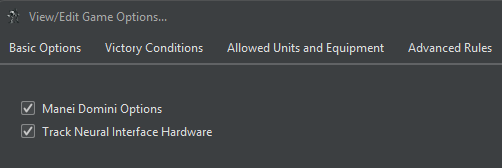
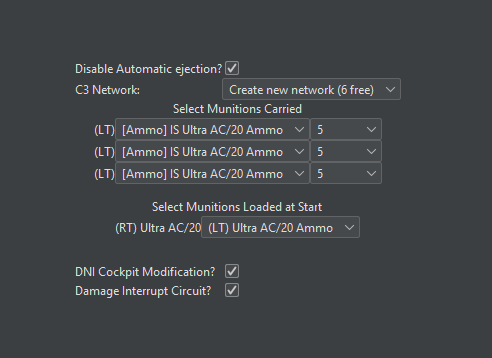
Quick Reference: What Do I Enable?
| I want to... | Toggle/Set |
|---|---|
| Use DNI/EI implants without worrying about equipment | Leave "Track Neural Interface Hardware" OFF |
| Enforce realistic hardware requirements | Turn "Track Neural Interface Hardware" ON, then add cockpit mods to units |
| Protect my pilot from ammo explosions | Add DIC to a BattleMek (works independently, no game option needed) |
| Get aimed shots with EI | Give pilot EI Implant, add EI Interface to unit (if tracking ON) |
| Get initiative bonus | Give pilot VDNI/BVDNI + TCP augmentation |
Note: If you enable “Track Neural Interface Hardware,” ProtoMeks will become Experimental tech level, as EI is classified as Experimental. If you’re running a campaign or game at Standard or Advanced rules levels, leave this option off to keep ProtoMeks available.
Munitions & Ordnance
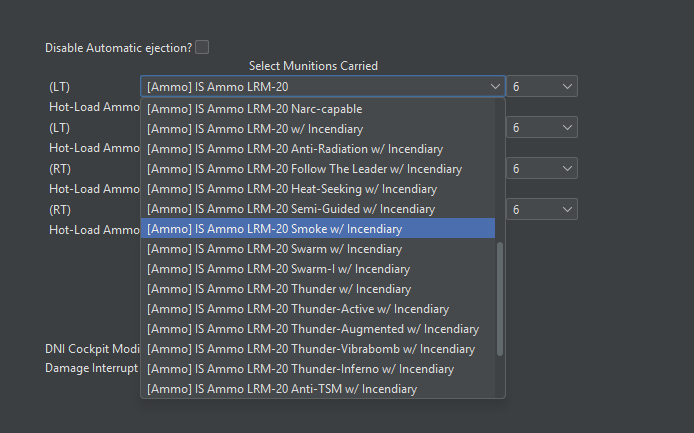
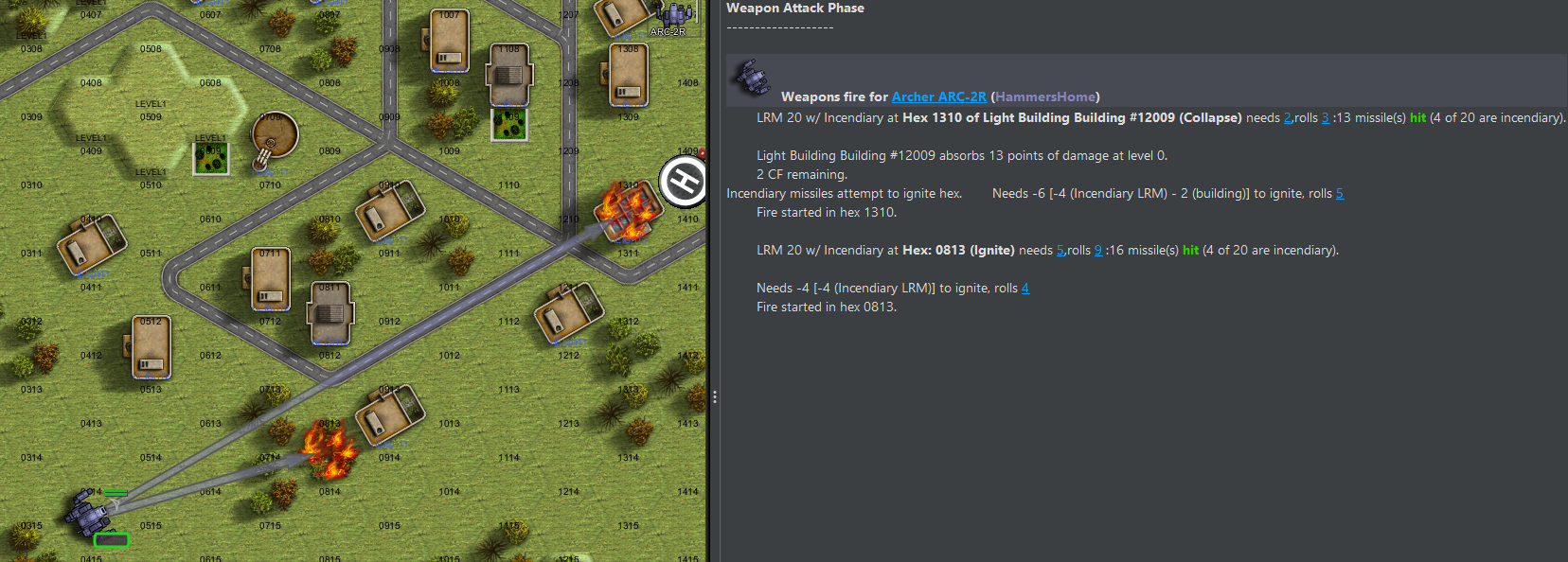
Some players just want to watch the world burn. Incendiary LRM munitions are now available and properly included in autoconfig selections. We’ve also added EMP Mines, which can now be deployed on the battlefield.

Combat Systems
MekWarriors can now abandon their ‘Meks under specific conditions per TacOps:AR p.165, with the ejection options reorganized for clarity. Vehicle crews also gain new survival options with the Combat Vehicle Escape Pod (CVEP) implemented per TO:AUE p.121.
Handheld Weapons
Handheld Weapons continue to receive stability fixes from their 0.50.10 debut (see Bug Fixes below).
Quality of Life
- Save Advanced Searches: Your custom search filters are now preserved between sessions
- Elevation Cross-Section Diagram: The Ruler/LOS Tool now includes an elevation cross-section diagram and consolidates the separate rulers into one, making LOS determination more intuitive
- Network Information Dialog: New dialog displays network connection details for multiplayer sessions
- Bot Priority Targeting by Range: You can now set bot priority target IDs by range, giving you finer control over Princess’s targeting behavior
- Board Editor Tagger: New board tagger menu item added to the Board Editor
Improvements
Princess / Bot
- EMP Mine Deployment: Princess can now deploy EMP mines just like other minefields
- Hidden Unit Detection: Fixed Princess incorrectly detecting hidden units through expected damage calculations. No more psychic Princess
- DropShip Pathfinding: Princess will no longer crash DropShips through buildings. She’s reckless, but not that reckless
- Performance: Weapon attack expected damage calculations are now cached, improving Princess’s decision-making speed
Board & Map
Several board and map improvements landed this release. BoardView drawing code has been unified for better consistency, and board files now support copyright header information. Custom deployment settings are clearer and less confusing, fortified hex indicators have been improved to reduce confusion, and the map now properly adapts to new entity types.
Display & Data
Unit readout tables have been improved, and the spotting field of view now correctly shows the Mast Mount elevation bonus. Quirks received proper tooltips with word wrapping and typo corrections, and display issues with the Static Ammo Feed weapon quirk have been resolved. Squadron support has been added for the MUL file format.
Bug Fixes
Combat & Damage
- Artillery Cluster Munitions: Fixed cluster munitions using incorrect hit tables. Above table for ‘Meks and front table for tanks now applied correctly
- Swarm LRMs: Fixed swarm LRMs incorrectly transferring immobile status to secondary targets
- Semi-Guided LRMs: Spotter movement modifiers now correctly applied when using Semi-guided LRMs against spotted (but not TAGged) targets
- AMS Double Engagement: Anti-Missile Systems no longer engage the same incoming attack twice
- Sprinting and Buildings: Sprinting units can no longer automatically hit adjacent buildings
- Sprinting and Clubs: ‘Meks can no longer pick up clubs while sprinting
- LRM Smoke Drift: Smoke from LRM rounds now drifts correctly
- Planted Fields LOS: Line of sight calculations through planted fields now work properly
Movement & Deployment
- Aerodyne Reverse Flight: Aerodyne aircraft can no longer fly backwards in atmosphere. Physics wins
- LAM Fly-Off: Fixed a crash when LAMs attempt to fly off the map
- Bridge Height: Units can once again move on height 0 bridges
- Tripod Turns: Tripod turn handling now works correctly
- Environmental Sealing: Environmental sealing checks now properly applied during movement and deployment
- ACAR Deployment: Fixed formations scheduled for round 0 that were never deploying
C3 / Networking
- C3M BV Bonus: Fixed incorrect BV bonus calculation when C3 Master is connected to C3 Master Master
- Nova Link: Fixed a crash in the /nova link command. As a reminder, players should be using the Nova CEWS GUI during the end phase rather than the command line
- Boosted C3 and AECM: Prevented infinite loop when a boosted C3 master is affected by Angel ECM
- ARAD and ECM: Anti-Radiation missiles are no longer incorrectly affected by ECM
Handheld Weapons
- Lobby Configuration: Fixed crash when configuring a ‘Mek carrying a handheld weapon in the lobby
- Impossible Shots: Fixed HHWs incorrectly flagging valid shots as impossible
- Weapon Drop: Fixed HHWs not properly dropping and remaining available in ‘Mek arms after being discarded
- RAC Ammo Source: Rotary Autocannons in handheld weapons now correctly draw ammo from the weapon entity
Units & Loading
- Command Console Head Hits: ‘Meks with Command Console cockpits and only one crew member no longer apply head hit damage twice to the single pilot
- Zero-Armor Aero Display: Aero units with zero armor no longer incorrectly show as damaged
- Single Fighters Option: Fixed lobby loading for fighters when “Single Fighters Not Capital” option is enabled
- Support Vehicle Loading: Fixed a crash from misinterpreted armor_tech field when loading support vehicles
- TSM Implant Damage Divisor: Fixed TSM implant incorrectly reducing damage divisor when the armor kit already has a divisor of 1.0
- Industrial Mek Heat: Industrial ‘Meks no longer assigned incorrect movement heat
- Silver Bullet Gauss: Hit modifier moved from ammo to weapon where it belongs
- MD Augmentation Availability: Fixed MD Augmentation tech availability checks
Interface & Display
- Cockpit Validation: Interface cockpit validation now works correctly
- Mission Equipment Storage: Removed incorrect validation that limited Mission Equipment Storage to one per unit
- Dazzle Mode: Dazzle mode no longer persists when the option is disabled
- Unit Overview: Fixed unit overview frame thickness display issues
- Bridge Collapse Warning: Bridge collapse warnings now display correctly
- Deployment Weapon Selection: Fixed crash when selecting an un-deployed unit’s weapons during the deployment phase
- Individual Initiative: Initiative bonuses for “Individual Initiative” now correctly come from the team, not the individual
MekHQ Integration
Fixed aerospace units returning to battle after being told not to, along with a related MekHQ POW capture bug. Also fixed a MekHQ save loading failure.
Additional Fixes
- Hand Actuator: Missing hand actuator penalty is no longer cumulative where it shouldn’t be
- Alpha Strike Conversions: Fixed Rail movement, MFB, and Conventional Infantry heat conversions for Alpha Strike
- Ammo Serialization: Fixed ammo mutator shortName and serialization issues
- Faction Advancement: Fixed setFactionsAdvancement and fallbackFactions ordering issues
- RAT Generator: Fixed RAT generator loading failures due to invalid unit type
- Modular Armor Cost: Corrected modular armor cost calculations
- Stealth Armor Validation: Stealth armor now properly validated on superheavy ‘Meks
- MASH on Small Craft: MASH now correctly displays on Small Craft record sheets
- Infantry Armor Panel: Custom armors only shown when rules level is set to Advanced or higher
MegaMekLab
New Features
Prosthetics & Augmentations UI
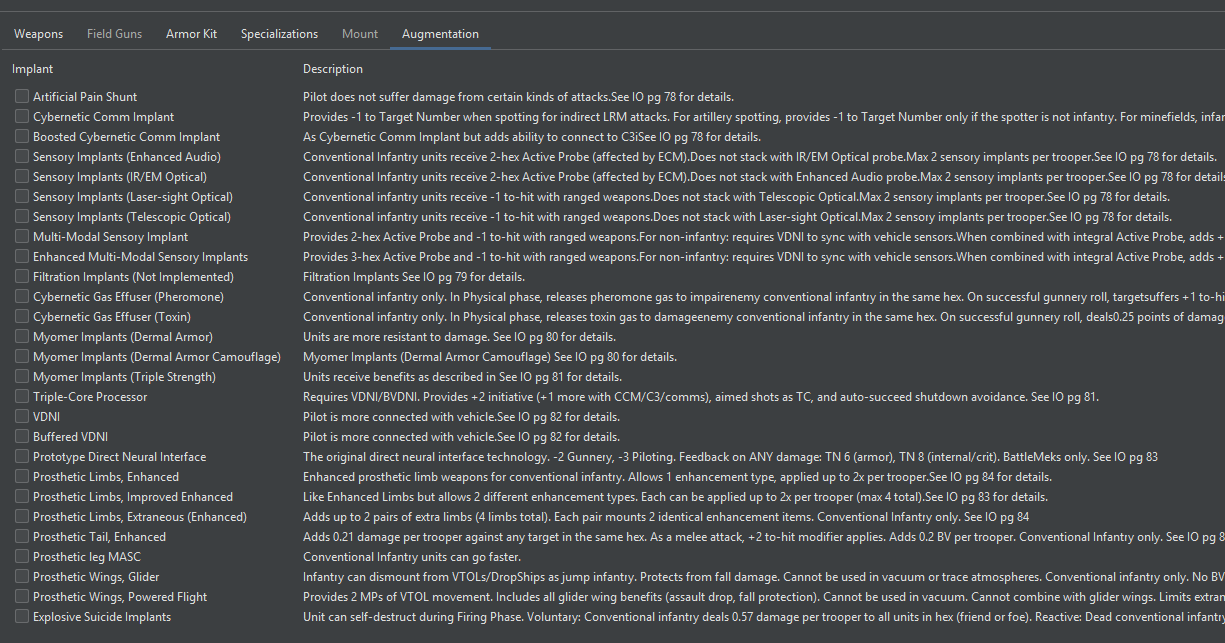
MegaMekLab now has full construction support for the new Interstellar Operations prosthetics and augmentations implemented in MegaMek this release, including prosthetic enhancements and extraneous prosthetic limbs for conventional infantry (IO p.84). The augmentation view also received validation and UX improvements with clearer feedback when something doesn’t fit.
Cockpit Modifications & Neural Interfaces UI
MegaMekLab construction support added for the DNI, EI Interface, and Damage Interrupt Circuit cockpit modifications implemented in MegaMek this release.
Construction Improvements
- CASE Selector: New CASE selector makes it easier to assign and manage CASE protection across locations
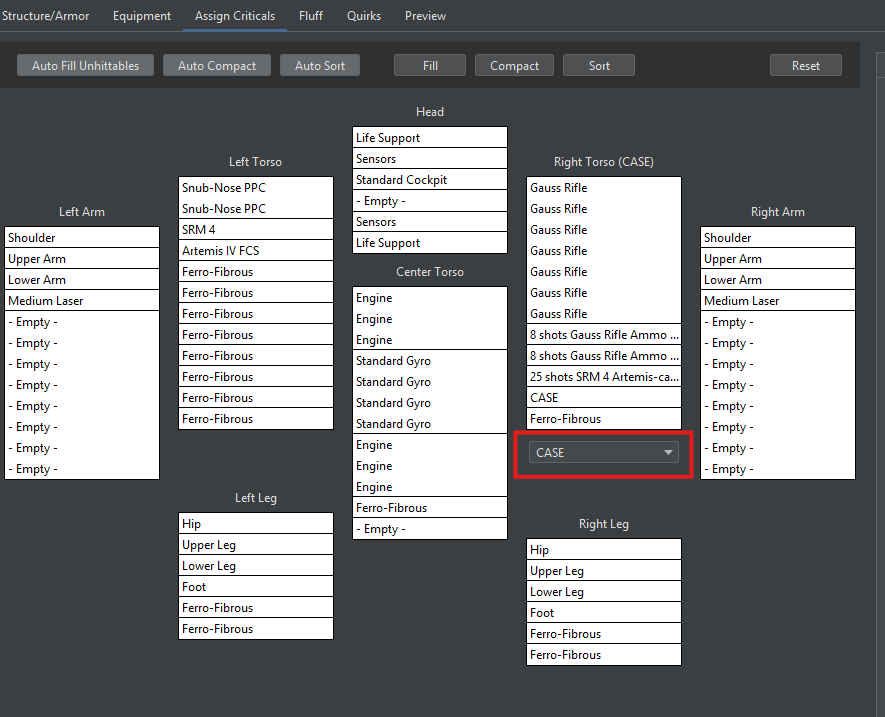
- More Engine Types for Conventional Fighters: Conventional fighters now allow additional engine type selections
- Bay Removal: You can now properly remove bays from units
Record Sheets & Data Display
- Vehicle Effectiveness Rules: Added a menu option to toggle the TacOps:AR p.105 Vehicle Effectiveness rules on Ground Combat Vehicle record sheets
- One-Shot Ammo on Record Sheets: Record sheets now print the ammo type loaded into OS and I-OS launchers. No more guessing what that one-shot launcher is carrying
- Punch Hit Modifier on Record Sheets: Punch hit modifiers now correctly reflect missing hand and lower arm actuators
- Stealth Armor Heat in Heat Profile: Stealth armor heat generation is now included in the heat profile calculations, giving you accurate heat numbers during design
- DPT Calculation with Ammo: Damage-per-turn calculations now factor in ammunition types and include configurable sustained turn counts
- Warship Structural Integrity: Warship SI now displays correctly on record sheets
- Bomb Rack in Equipment Database: Bomb Rack now appears in the MML Equipment Database where you’d expect to find it
Bug Fixes
- FluffTab Persistence: Fixed FluffTab not persisting on save, plus added UI for setting fluff dates on units
- RISC Pulse Module Heat: Fixed duplicate heat from RISC Pulse module appearing in the StatusBar heat display
- Primitive Aerospace Armor: Fixed (yet again) primitive aerospace armor handling
- Patchwork Armor: Various patchwork armor issues resolved
- Armor Type Fallback: Fixed fallback to allowed armor types when an invalid type is selected
- Battle Armor Criticals: Fixed critical slot handling on Battle Armor
- Aero Criticals and Drag-and-Drop: Fixed critical slot issues on aerospace units, including drag-and-drop functionality
- Bay Weapon Critical Tree: Fixed a crash when the refresh listener is null in BayWeaponCriticalTree
- Extra Parenthesis: Removed a stray “)” that was appearing in the UI
- GUI Maintenance: Various GUI cleanup and consistency improvements
MekHQ
New Features
Temporary Crew: Personnel Simplification
A long-requested quality-of-life feature. Certain personnel roles can now be filled with optional temporary crew. This simplifies unit management for situations where you need bodies in seats without the full recruitment process. Temp crew works across multiple unit types including tanks and Battle Armor, with full save/load support.
This is a new feature and went through a round of bug fixes during development. Units with temp crew no longer disappear when loading a save, tanks with temp crew can now deploy properly, and temporary Battle Armor crew now properly fill BA suits.
Canon Diseases & Bioweapons
The medical system expands with canon disease and bioweapon support. This includes herd immunity mechanics, a disease glossary entry, and specific implementations like Ageranium’s Disease and Dobrowski Depression-A Syndrome as character flaws. The Inner Sphere just got a little more dangerous, and not just from autocannon fire.
“Force” Renamed to “Formation”
Throughout MekHQ, what was previously called a “Force” is now called a “Formation.” This aligns terminology more closely with BattleTech usage and should reduce confusion for players coming from the tabletop.
Partial XP Skill Progress
Characters can now accumulate partial XP progress toward skill improvements. No more losing XP because you didn’t have quite enough to cross the threshold. Progress is tracked and carried forward.
Improvements
Campaign Management
- Contract Search Radius: The minimum contract search radius has been reduced from 100 to 1 light-year, giving you finer control when looking for work close to home
- C3i and Nova CEWS in TO&E: Fixed C3i display in the TO&E and implemented Nova CEWS support, so your network-equipped formations display correctly
- Color Explanation Tooltips: Tables throughout MekHQ now include color explanation tooltips — hover to understand what those highlighted rows actually mean
- Campaign Options Iconography: Updated icons for campaign options in 0.50.12
- Campaign Option Badges: Improved badge handling for campaign options
- Surgeon Skill Display: The prosthetic surgery dialog now shows the surgeon’s skill level instead of a raw target number — much more intuitive
- Daily Report Tabs: Category tabs in the daily report no longer highlight when they’re empty
- Salvage Picker Buttons: Confirmation buttons in the salvage picker have been repositioned for better usability
- Hotkey Improvements: Addressed various hotkey issues throughout MekHQ
StratCon
- Mapless StratCon VP Scoring: Fixed VP scoring for Fleet in Being and Refused Engagement scenarios in Mapless StratCon
- Completed Objectives: Fixed an issue where completed StratCon objectives were being invalidated by subsequent scenario losses — your victories now stick
- Advanced Scouting Boundary: Advanced Scouting can no longer scout off the edge of the StratCon board
- Eagle Eyes Rolls: Fixed Eagle Eyes rolls for Advanced Scouting
- Maneuver/Auxiliary Reinforcement Reporting: Fixed roll reporting for maneuver and auxiliary reinforcements
Personnel & Medical
Improved tooltip fetching for academies with graceful failure handling. Transport cost display and calculation semantics have been fixed, along with transport reporting for Conventional Fighters, Fixed-Wing Support, and ProtoMeks.
Bug Fixes
Campaign & Contract
- Contract Generation for Absorbed Factions: Fixed contract generation for factions that have been absorbed by super-states — no more missing contracts because your employer got conquered
- Custom/Unknown Factions: Fixed a crash when loading campaigns with custom or unknown factions
- Force Self-Assignment: Prevented a formation from being assigned as its own subformation — because that’s a paradox, not a TO&E
- Formations Returning from AoO Map: Fixed formations not returning from the Area of Operations map
- Learning Ropes Campaign: Updated the learning ropes tutorial campaign for 0.50.11 compatibility
Combat & Scenarios
Fixed an issue where new pilot hits were being doubled when resolving a scenario. Permanent injuries can no longer be replaced by temporary ones, a double scaling issue affecting unit display has been resolved, and the BotForce Randomizer no longer throws errors or generates nothing when weight class isn’t set.
Personnel & Equipment
- XP Spending Crash: Fixed a crash when spending XP on new skills
- GM Edit Person Dialog: Fixed a crash in the GM Edit Person dialog caused by a missing Enhanced Imaging resource
- Missing Swap Ammo Menu: Fixed the “Swap ammo” menu not appearing for some units
- Armor Location in Salvage: Fixed armor location not displaying when stripping units in salvage mode
- Warehouse Armor Warning: Fixed a false warning about no armor in the warehouse
- MRMS Infinite Loop: Prevented an infinite MRMS loop when an AmmoBin repair can’t be fulfilled
- MRMS Resource Bundle: Corrected resource bundle reference in MRMS service
- Ammo Type Casting: Fixed a type check before casting ammo types to prevent errors
Miscellaneous
- Planet Temperature Data: Fixed a crash when accepting a contract on a planet with missing temperature data
- Academy Tooltip Crash: Fixed an IndexOutOfBoundsException in academy tooltips for mismatched curriculum data
- User Academy Files: Fixed a crash when user academy files replace base academies
- Commander Death: Fixed a missing resource exception when killing the campaign commander
- MASH Rentals: MASH facility rentals now actually work
- Campaign Option Labels: Fixed minor text and label errors in campaign options
Data Improvements (MM-Data)
Our data contributors continue to improve the unit files and game data that drive the MegaMek experience. Highlights from this release:
Unit Fixes & Additions
A variety of unit fixes across all unit types this release, including corrected techbases, fixed ammo loads, updated manipulators and motive types, validation fixes, and new variants like the Rifleman (Legend Killer 2) and Rifleman II (Legend Killer). JumpShip, DropShip, Battle Armor, and Clan unit data all received corrections. We also did a comprehensive fluff data pass improving manufacturer info, model descriptions, and historical context across all unit types.
Campaign & Faction Data
Various faction and campaign data improvements including updated ranks data, corrected force generation ratings and availability data for multiple eras and factions, and supporting data for features called out in the MekHQ and MegaMekLab sections above.
Coming in 0.50.13: March SUCS Data
For those following our collaboration with the SUCS team on Sarna, we’re excited to share that the March SUCS data drop will be incorporated into the 0.50.13 release. This means updated system ownership, coordinates, and faction data flowing into the Interstellar Map. If you haven’t checked out the interactive map on our website, give it a look.
This release includes numerous additional fixes and under-the-hood improvements not individually listed here across all three programs. For a complete list of all changes, please refer to the change log section at the end of these release notes or visit the individual PR descriptions on GitHub.
Technical Stuff
Java 17 and Java 21 are Supported for all 0.50.x Releases
Starting with this release, we officially support both Java 17 and Java 21. Both versions follow the same installation process. Our guide to Updating to Adoptium (Eclipse Temurin Open Source Java) uses Java 17 as the example, but if you’d prefer Java 21, simply select Java 21 instead of Java 17 during installation. Everything else in the directions remains the same.
It’s crucial to read the directions carefully, especially Step 6, which covers a recent change to the Adoptium installer. Make sure to select “Install for all users of this machine” in the Installation Scope.
We continue testing against Java 25 and things look optimistic, but it will likely be later this year before we’re willing to commit to a full move. If you choose to use a Java version beyond 21 that isn’t officially supported, our standard response for issues will be to revert to Java 17 or 21.
WARNING: Java 24 was released (18 March 2025)! If you are running on an older 32-bit OS, DO NOT INSTALL JAVA 24 or later as they have officially dropped support for 32-bit Windows.
Running a Dedicated Server with Docker
Want to host your own MegaMek server? Docker images for MegaMek dedicated servers now support user folders for custom content. For setup instructions, visit the Docker guide on MegaMek.games.
Important: MekHQ Campaign Update Instructions
It is critical to follow these steps to ensure the integrity of your MekHQ campaign when updating between versions. Failure to follow these steps can result in the corruption of your campaign file.
Treat each release as stand-alone; Copy, never Move your data forward from older versions. MekHQ is NOT backward compatible.
- Make a backup of your campaign and custom files. This is a critical step to prevent data loss!
- DO NOT COPY MegaMek saves or any preference file from a different version to avoid compatibility issues.
- Update MekHQ to the latest version. NEVER overwrite the existing folder; always keep each version in its own folder.
- Re-save any custom presets to ensure they are updated with the new version’s settings.
A Few Reminders
The Milestone System Summary
Please see this link for details on our Milestone release system.
State of the Universe & Development Updates
If you haven’t read our recent posts, we recommend checking out:
User Data Directory
We have a customizable User Data Directory feature that allows you to set a single external directory for storing game resources like units, camos, and fonts, accessible across different installations and versions.
Set up this directory via client settings. A game restart is required for changes to take effect.
Social Media
Join our official MegaMek Discord, our primary community hub for the suite. We offer voice support, individual channels, and assistance for the official public servers. We’re also part of community Discords Everything BattleTech and Classic BattleTech. Find us on Facebook at MegaMek BattleTech and MegaMek.
Contributing
Interested in contributing? Find out how here.
Change Logs (Release Specific) and Download Links
MegaMek Change Log
Full Changelog: View on GitHub Download MegaMek 0.50.12
MegaMekLab Change Log
Full Changelog: View on GitHub Download MegaMekLab 0.50.12
MekHQ Change Log
Full Changelog: View on GitHub Download MekHQ 0.50.12